Twilio AI Receptionist API Setup: Developer Integration Guide

24 min read
Yanis Mellata
AI Technology

You're building an AI receptionist. Customers call, AI answers, captures lead data, routes emergencies to humans, logs everything to your CRM. You know you need a telephony layer to handle actual phone calls, and Twilio keeps coming up in every developer discussion.

Here's the reality: In our analysis of 13,175 customer service calls from 45 home services contractors over 7 months, we found that 74.1% went completely unanswered. That's three out of every four potential customers calling someone else. An AI receptionist fixes this, but you need rock-solid telephony underneath.

This guide walks you through integrating Twilio Programmable Voice with AI models—covering three different approaches, webhook patterns that won't break in production, CRM integration code, and real cost calculations.

Why Twilio for AI Receptionists

Twilio is the developer-first telephony platform. If you're building voice applications programmatically, you've probably already considered it. Here's why it makes sense for AI receptionist use cases.

Market Position: The Developer-First Telephony Platform

Twilio serves over 300,000 developer customers globally. When the OpenAI Realtime API launched, Twilio was the integration partner announced alongside it. The ecosystem is massive: every major programming language has an SDK, the documentation is thorough, and Stack Overflow has answers for most implementation questions.

Compared to alternatives like Vonage or Plivo, Twilio's developer documentation remains the gold standard. You'll spend less time debugging ambiguous error messages and more time building features.

Core Value: Twilio Handles Phones, You Handle AI

The separation of concerns is clean. Twilio manages:

  • Phone number provisioning (local, toll-free, international)
  • PSTN routing and SIP trunking
  • Call quality and network reliability
  • Compliance (HIPAA-eligible services, call recording regulations)

You manage:

  • AI conversation logic (speech-to-text, LLM, text-to-speech)
  • Business rules (routing, data collection, CRM integration)
  • Custom workflows specific to your use case

Twilio routes the phone call to your webhook. You return instructions (in TwiML) or stream audio to your AI pipeline. That's it.

The Ecosystem Advantage

When you build on Twilio, you get access to:

  • Pre-built integrations: Connect to Salesforce, HubSpot, Zendesk, Slack without writing custom code
  • Add-on services: Real-time transcription (119 languages), call recording, fraud detection, phone number lookup
  • Serverless Functions: Deploy webhook logic without managing servers
  • Studio: No-code workflow builder for simpler use cases

For an AI receptionist, this means you can focus on the AI conversation quality instead of reinventing telephony infrastructure.

Core Twilio Concepts You Need

Before diving into code, you need to understand four core concepts. These are the building blocks every Twilio voice integration uses.

Programmable Voice API: Make and Receive Calls

Twilio Programmable Voice is a REST API that lets you make, receive, and monitor calls programmatically. You can initiate outbound calls via HTTP POST, receive call metadata, and modify calls in progress. For an AI receptionist, you'll primarily use inbound call handling.

TwiML: XML Instructions for Call Handling

TwiML (Twilio Markup Language) is XML-based markup that tells Twilio what to do during a call. When someone calls your Twilio number, Twilio requests instructions from your webhook. You respond with TwiML.

Here's a basic example:

<?xml version="1.0" encoding="UTF-8"?>
<Response>
    <Say voice="Polly.Joanna">
        Thank you for calling. An AI assistant will help you shortly.
    </Say>
    <Pause length="1"/>
</Response>

Common TwiML verbs:

  • <Say>: Text-to-speech playback
  • <Gather>: Collect DTMF digits or speech input
  • <Dial>: Transfer call to phone number or SIP endpoint
  • <Stream>: Open WebSocket for real-time audio
  • <Connect>: Connect to Twilio AI Assistant or media stream

Webhooks: How Twilio Talks to Your Server

When events happen (incoming call, digits gathered, call ended), Twilio sends HTTP POST requests to your webhook URLs. Your server processes the request and responds with TwiML or handles data collection.

For example: A call comes in — Twilio POSTs to https://yourdomain.com/voice — You return TwiML saying "Hello, how can I help?" — Caller responds — Twilio POSTs speech data to your /gather webhook — You return TwiML with next instruction.

Webhooks are stateless. Twilio doesn't remember previous interactions unless you store state in your database or session.

Media Streams: Access Real-Time Audio

Media Streams gives you access to raw audio from the call via WebSocket. This is critical for real-time AI integrations. You can:

  • Receive bidirectional audio streams (mulaw, 8kHz)
  • Send processed audio back to the call
  • Stream to speech-to-text services in real-time
  • Process sentiment analysis or wake-word detection

For AI receptionists using OpenAI's Realtime API or similar, you'll use Media Streams to pipe audio directly to the AI model.

Quick Start: Your First Twilio Call

Let's get a working integration running in under 30 minutes.

Create Account and Get Credentials

  1. Sign up at twilio.com
  2. Verify your email and phone number
  3. Navigate to the Console Dashboard
  4. Copy your Account SID and Auth Token (you'll use these in every API request)

Store these in environment variables, never commit them to code:

TWILIO_ACCOUNT_SID=ACxxxxxxxxxxxxxxxxxxxxx
TWILIO_AUTH_TOKEN=your_auth_token_here

Buy a Phone Number

In the Twilio Console:

  1. Go to Phone Numbers — Buy a Number
  2. Select your country and search by area code or capabilities
  3. Filter for "Voice" capability
  4. Purchase the number ($1/month for most US local numbers)

You now have a phone number that can receive calls. Next, you need to tell Twilio what to do when someone calls it.

Set Up Webhook Server (Node.js Example)

Here's a minimal Express.js server that handles incoming calls:

const express = require('express');
const VoiceResponse = require('twilio').twiml.VoiceResponse;

const app = express();
app.use(express.urlencoded({ extended: false }));

app.post('/voice', (req, res) => {
    const twiml = new VoiceResponse();
    twiml.say({
        voice: 'Polly.Joanna'
    }, 'Hello! This is your AI receptionist. How can I help you today?');

    // Gather speech input
    const gather = twiml.gather({
        input: 'speech',
        action: '/process-speech',
        speechTimeout: 'auto'
    });

    res.type('text/xml');
    res.send(twiml.toString());
});

app.post('/process-speech', (req, res) => {
    const speechResult = req.body.SpeechResult;
    console.log('Caller said:', speechResult);

    const twiml = new VoiceResponse();
    twiml.say(`You said: ${speechResult}. Let me help you with that.`);

    res.type('text/xml');
    res.send(twiml.toString());
});

app.listen(3000, () => {
    console.log('Webhook server running on port 3000');
});

Configure Number to Use Your Webhook

Local Development: Twilio needs a public URL to send webhooks. Use ngrok to expose your localhost:

ngrok http 3000

This gives you a public URL like https://abc123.ngrok.io.

Configure in Console:

  1. Go to Phone Numbers — Manage Numbers — Active Numbers
  2. Click your purchased number
  3. Under "Voice Configuration":
    • When a call comes in: Webhook
    • URL: https://abc123.ngrok.io/voice
    • HTTP POST
  4. Save

Test Your First Inbound Call

Call your Twilio number. You should hear: "Hello! This is your AI receptionist. How can I help you today?"

Speak a response. The server logs what you said and responds back.

You just built a working voice webhook. Now let's connect it to real AI.

Three Paths to AI Integration

You have three main options for integrating AI conversation logic with Twilio. Each has different tradeoffs for ease, control, latency, and cost.

Option 1: Twilio AI Assistants (Managed Solution)

Twilio AI Assistants is Twilio's managed framework for building conversational AI. It's built on OpenAI's GPT-4 and handles the complete voice pipeline for you.

  • How it works:

  • Define your assistant's personality and tools in the Twilio Console

  • Connect to your phone number with a single TwiML <Connect> verb

  • Twilio handles STT, LLM orchestration, and TTS automatically

  • Your assistant can call external APIs via tool definitions

  • Pros:

  • Easiest to set up (no Media Streams or WebSocket code)

  • Built-in safeguards (prompt injection detection, content moderation)

  • Integrated logging and analytics

  • Cons:

  • Less control over AI model selection (locked to GPT-4)

  • Higher per-minute cost (~$0.05+)

  • Limited customization of voice pipeline

Best for: Getting an AI receptionist running quickly without building custom voice infrastructure.

Option 2: OpenAI Realtime API (Direct Integration)

The OpenAI Realtime API enables direct Speech-to-Speech (S2S) conversations. Instead of chaining STT — LLM — TTS, the model processes audio directly and responds with audio.

  • How it works:

  • Use Twilio Media Streams to open WebSocket to your server

  • Your server proxies audio to OpenAI Realtime API

  • Model responds with audio, you stream back to Twilio

  • Handles interruptions and conversational turns natively

  • Pros:

  • Lower latency (~400ms) due to S2S architecture

  • Full control over conversation logic

  • Can use function calling for external integrations

  • More cost-effective than managed solutions

  • Cons:

  • Requires WebSocket server infrastructure

  • More complex to implement (audio encoding, session management)

  • You handle error scenarios and fallbacks

Best for: Developers who need full control and lowest latency for production apps.

Code snippet (Node.js WebSocket server):

const WebSocket = require('ws');
const wss = new WebSocket.Server({ port: 8080 });

wss.on('connection', (twilioWs) => {
    const openaiWs = new WebSocket('wss://api.openai.com/v1/realtime');

    // Relay audio from Twilio to OpenAI
    twilioWs.on('message', (message) => {
        const msg = JSON.parse(message);
        if (msg.event === 'media') {
            openaiWs.send(JSON.stringify({
                type: 'input_audio_buffer.append',
                audio: msg.media.payload
            }));
        }
    });

    // Relay responses from OpenAI back to Twilio
    openaiWs.on('message', (data) => {
        const response = JSON.parse(data);
        if (response.type === 'response.audio.delta') {
            twilioWs.send(JSON.stringify({
                event: 'media',
                media: { payload: response.delta }
            }));
        }
    });
});

Option 3: VAPI Bridge (Production-Optimized)

VAPI is a purpose-built voice AI platform that bridges Twilio with AI models. It's what NextPhone uses in production.

  • How it works:

  • VAPI handles the entire voice pipeline (STT, LLM, TTS, interruption handling)

  • You configure assistants with prompts, tools, and integrations

  • VAPI connects to your Twilio number via SIP or Media Streams

  • Sub-500ms latency with built-in optimizations

  • Pros:

  • Production-ready features (analytics, monitoring, A/B testing)

  • Multi-model support (OpenAI, Anthropic, custom models)

  • Built-in tool calling for CRM integration

  • Handles edge cases (interruptions, silence detection, fallbacks)

  • Cons:

  • Additional platform cost (~$0.012/min on top of Twilio)

  • Less control than direct OpenAI integration

  • Requires understanding another platform's abstractions

Best for: Production applications where you need reliability, features, and don't want to maintain voice infrastructure.

Which Approach Should You Choose?

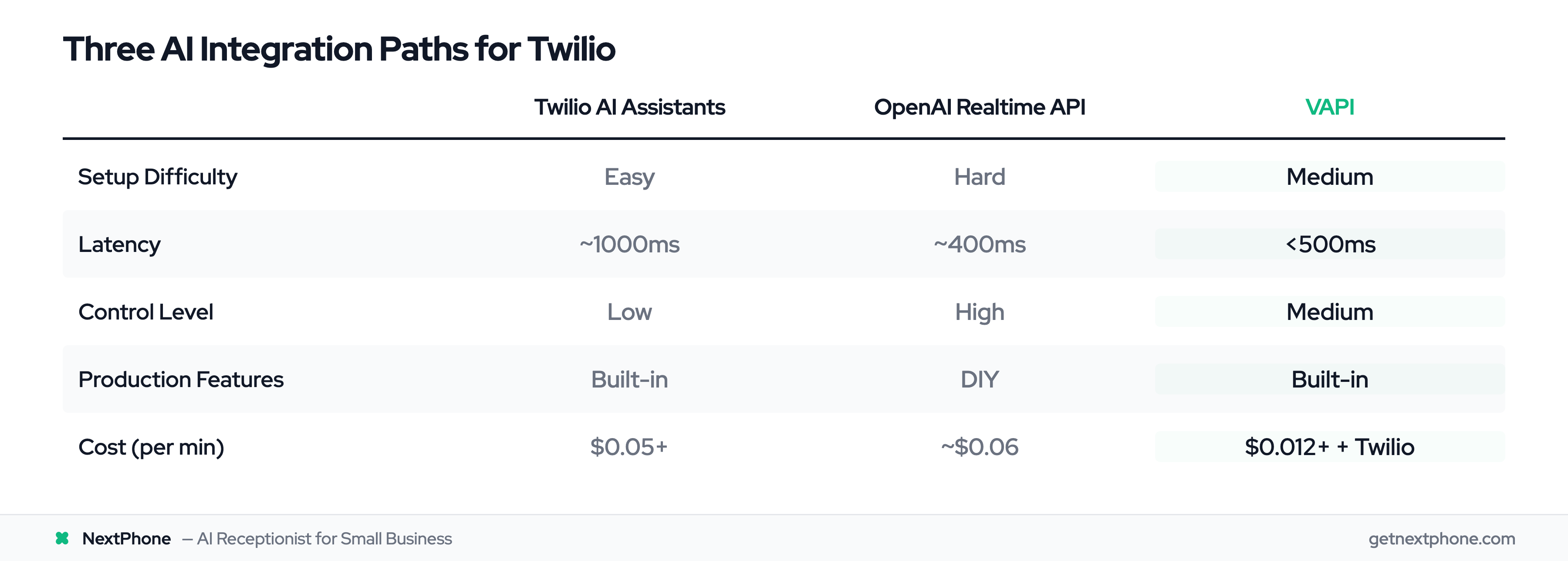
FeatureTwilio AI AssistantsOpenAI Realtime APIVAPI
Setup DifficultyEasyHardMedium
Latency~1000ms~400ms<500ms
ControlLowHighMedium
Production FeaturesBuilt-inDIYBuilt-in
Cost (per min)$0.05+~$0.06 (API only)$0.012+ VAPI + Twilio

Use AI Assistants if: You're prototyping quickly and want minimal code.

Use OpenAI Realtime if: You need full control and are comfortable managing WebSocket infrastructure.

Use VAPI if: You're building a production application and want reliability with less maintenance burden. This is what NextPhone uses—we evaluated all three and chose VAPI for its production features and sub-500ms latency.

Implementing Secure Webhooks

Webhooks are how your application receives data from Twilio. Get this wrong and you'll face security vulnerabilities or dropped calls in production.

Validating Twilio Request Signatures

Never trust incoming requests blindly. Twilio signs every request using HMAC-SHA1 with your Auth Token and sends the signature in the X-Twilio-Signature header.

Always validate this signature:

const twilio = require('twilio');

app.post('/voice', (req, res) => {
    const twilioSignature = req.headers['x-twilio-signature'];
    const url = `https://yourdomain.com/voice`;

    // Validate request came from Twilio
    const isValid = twilio.validateRequest(
        process.env.TWILIO_AUTH_TOKEN,
        twilioSignature,
        url,
        req.body
    );

    if (!isValid) {
        return res.status(403).send('Forbidden');
    }

    // Process webhook...
    const twiml = new VoiceResponse();
    twiml.say('Validated request from Twilio');

    res.type('text/xml');
    res.send(twiml.toString());
});

If validation fails, reject the request. This prevents attackers from flooding your webhook with fake call data.

Queue First, Process Later Pattern

Your webhook must respond quickly. Twilio has a 15-second timeout, and you only get one retry attempt if your webhook fails.

Best practice from webhook experts: Queue the work and return 200 OK immediately.

const Queue = require('bull'); // Or any job queue
const callQueue = new Queue('call-processing');

app.post('/call-ended', async (req, res) => {
    // Validate signature first (code from above)

    // Queue the processing job
    await callQueue.add({
        callSid: req.body.CallSid,
        from: req.body.From,
        to: req.body.To,
        duration: req.body.CallDuration,
        recordingUrl: req.body.RecordingUrl
    });

    // Return 200 immediately
    res.status(200).send('OK');
});

// Process jobs asynchronously
callQueue.process(async (job) => {
    const callData = job.data;

    // Send to CRM (can take 2-5 seconds)
    await sendToCRM(callData);

    // Send follow-up email
    await sendEmail(callData);

    // Log to analytics
    await logAnalytics(callData);
});

This pattern prevents timeouts. Even if your CRM API is slow, Twilio gets an immediate response and moves on.

Handling Webhook Timeouts and Retries

Twilio uses the I-Twilio-Idempotency-Token header to distinguish retry attempts. Check for this token to avoid processing the same webhook twice:

const processedTokens = new Set(); // In production, use Redis

app.post('/webhook', (req, res) => {
    const idempotencyToken = req.headers['i-twilio-idempotency-token'];

    if (processedTokens.has(idempotencyToken)) {
        // Already processed this request
        return res.status(200).send('OK');
    }

    processedTokens.add(idempotencyToken);

    // Process webhook...
});

Also configure a fallback URL in your phone number settings. If your primary webhook fails, Twilio will try the fallback. This can be a simple TwiML Bin that says "Please try again later" instead of hanging up.

Local Development Workflow

Use environment variables for all secrets:

require('dotenv').config();

const accountSid = process.env.TWILIO_ACCOUNT_SID;
const authToken = process.env.TWILIO_AUTH_TOKEN;
const client = require('twilio')(accountSid, authToken);

For local webhook testing:

  • Use ngrok to expose localhost: ngrok http 3000
  • Update your Twilio number's webhook URL to the ngrok URL
  • Watch webhook requests in the ngrok dashboard
  • When you restart ngrok, the URL changes—use ngrok's static domains or update Twilio config each time

Integrating with Your CRM

Here's the hard truth: 25.4% of callers in our analysis explicitly request callbacks. Without a webhook sending that data to your CRM, those leads disappear.

An AI receptionist that captures data but doesn't integrate with your sales workflow is just an expensive voicemail system.

Why Webhook to CRM Matters (The 25.4% Problem)

Our data from 13,175 calls shows that one in four callers says something like "Can you call me back?" or "I'll need a quote—here's my number." If that information lives only in a call transcript, your sales team will never see it.

The solution: POST lead data to your CRM immediately after the call ends.

Webhook Payload: What Data You Get from Calls

When a call ends, Twilio sends a webhook to your statusCallback URL with:

  • CallSid: Unique call identifier
  • From: Caller's phone number
  • To: Your Twilio number
  • CallDuration: Length in seconds
  • RecordingUrl: Link to call recording (if enabled)

Your AI assistant can also collect custom data during the conversation:

  • Caller's name
  • Email address
  • Reason for call
  • Budget or timeline
  • Urgency level (our data shows 15.9% of calls contain urgency language)

Code Example: Posting Leads to HubSpot

Here's a complete webhook handler that captures call data and creates a contact in HubSpot:

async function sendLeadToCRM(callData) {
    const hubspotPayload = {
        properties: {
            firstname: callData.callerName,
            phone: callData.callerNumber,
            lastname: callData.callerLastName || '',
            lead_source: 'AI Receptionist Call',
            hs_lead_status: callData.isUrgent ? 'OPEN' : 'NEW',
            notes: callData.callSummary,
            urgency_level: callData.isUrgent ? 'High' : 'Normal',
            callback_requested: callData.requestedCallback ? 'Yes' : 'No'
        }
    };

    const response = await fetch('https://api.hubapi.com/crm/v3/objects/contacts', {
        method: 'POST',
        headers: {
            'Authorization': `Bearer ${process.env.HUBSPOT_API_KEY}`,
            'Content-Type': 'application/json'
        },
        body: JSON.stringify(hubspotPayload)
    });

    if (!response.ok) {
        throw new Error(`HubSpot API error: ${response.status}`);
    }

    return await response.json();
}

// Webhook handler
app.post('/call-ended', async (req, res) => {
    // Return 200 immediately (queue pattern from earlier)
    res.status(200).send('OK');

    // Process asynchronously
    const callData = {
        callSid: req.body.CallSid,
        callerNumber: req.body.From,
        callerName: req.body.CallerName, // From AI extraction
        callSummary: req.body.TranscriptSummary, // From AI
        isUrgent: req.body.DetectedUrgent === 'true',
        requestedCallback: req.body.RequestedCallback === 'true'
    };

    try {
        await sendLeadToCRM(callData);
        console.log('Lead sent to HubSpot:', callData.callSid);
    } catch (error) {
        console.error('Failed to send to CRM:', error);
        // Implement retry logic or alert
    }
});

For Salesforce, the pattern is similar—use their REST API to create Lead or Contact objects.

Template Variables and Dynamic Data

If you're using a platform like VAPI or Twilio AI Assistants, they support template variables in webhooks:

{
  "url": "https://api.hubspot.com/contacts/v1/contact",
  "method": "POST",
  "headers": {
    "Authorization": "Bearer [hubspot_api_key]"
  },
  "body": {
    "properties": [
      { "property": "firstname", "value": "[caller_name]" },
      { "property": "phone", "value": "[caller_number]" },
      { "property": "message", "value": "[call_summary]" }
    ]
  }
}

The AI assistant fills in variables like [caller_name] based on what it extracted from the conversation. This is how NextPhone handles CRM integration—configure once, works for every call.

Cost Analysis: What You'll Actually Pay

Let's calculate real costs for running 1000 calls per month through a Twilio-based AI receptionist.

Twilio Voice API Pricing Breakdown

Twilio voice pricing in the US (as of 2025):

  • Inbound calls: $0.0085 per minute
  • Outbound calls: $0.014 per minute
  • Phone number: $1.00 per month (local US number)

For an AI receptionist, you're mostly handling inbound calls.

AI Costs (OpenAI, Deepgram, etc.)

  • OpenAI Realtime API (if using Option 2):

  • Approximately $0.06 per minute for GPT-4o S2S

  • Includes both speech-to-text and text-to-speech in one API call

  • Alternative stack (separate STT/TTS):

  • Deepgram STT: $0.0043 per minute

  • OpenAI GPT-4: ~$0.01 per minute (depends on token usage)

  • ElevenLabs TTS: ~$0.018 per minute

  • Total: ~$0.03 per minute

VAPI pricing: ~$0.012 per minute (includes full voice pipeline)

Infrastructure and Hosting

  • Webhook server hosting options:
  • Vercel Functions (serverless): Free for low volume, ~$20/month for production
  • Railway or Render: $5-20/month for small app
  • AWS Lambda + API Gateway: Pay per request, typically $10-30/month

Real-World Example: 1000 Calls/Month

Assumptions:

  • 1000 inbound calls per month
  • Average call duration: 5 minutes
  • Total: 5000 minutes

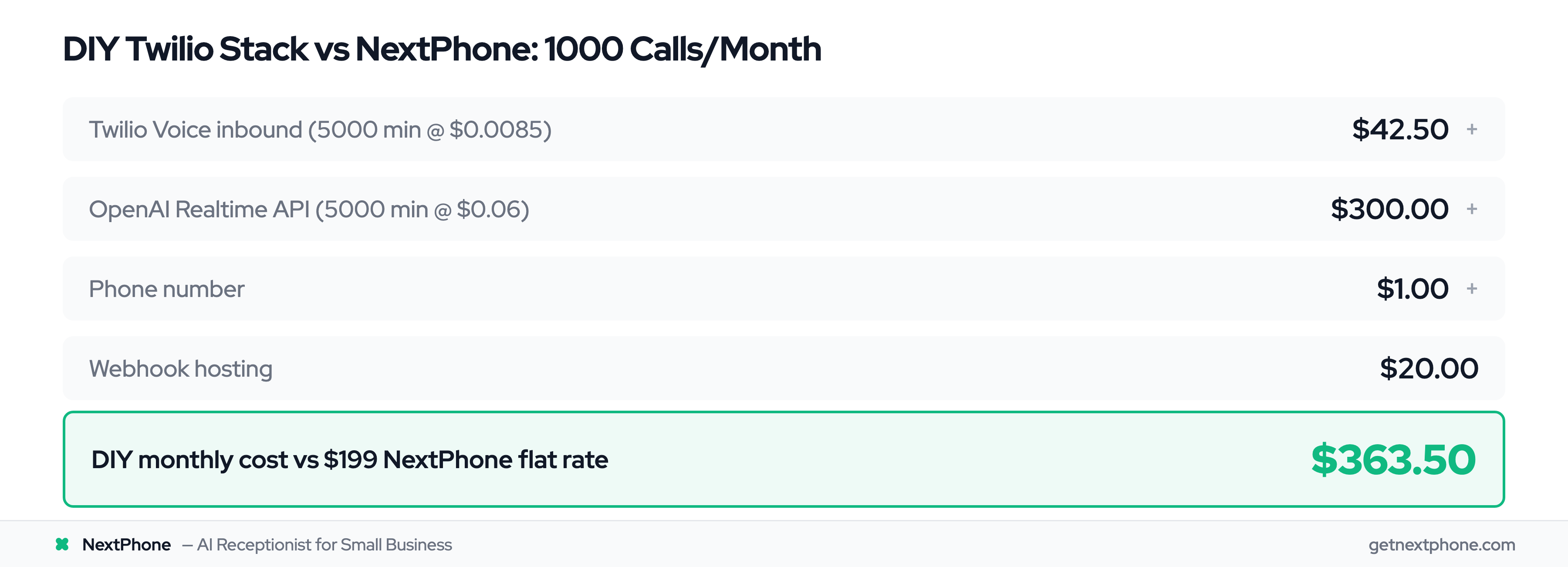
Cost breakdown (using OpenAI Realtime API):

ComponentUnit Cost1000 Calls (5000 min)Notes
Twilio Voice (inbound)$0.0085/min$42.50Telephony
OpenAI Realtime API$0.06/min$300.00S2S conversation
Phone Number$1/mo$1.00One number
Webhook HostingVariable$20.00Vercel or Railway
Total-$363.50Variable cost

Alternative (using VAPI):

ComponentUnit Cost1000 Calls (5000 min)Notes
Twilio Voice$0.0085/min$42.50Telephony
VAPI$0.012/min$60.00Voice pipeline
Phone Number$1/mo$1.00One number
Webhook HostingVariable$20.00Minimal
Total-$123.50VAPI more cost-effective at scale
  • NextPhone comparison:
  • $199/month flat rate
  • Unlimited calls (no per-minute charges)
  • Includes CRM integration, SMS follow-ups, call routing, emergency detection
  • No development or maintenance time

Context: Our factbase data shows contractors lose an average of $260,400 per year to missed calls. A $200-400/month AI receptionist pays for itself if it captures even 2-3 additional jobs.

Production Best Practices

You've got it working locally. Here's what you need before going to production.

Environment Variables and Secrets Management

Never commit credentials to version control:

# .env file (add to .gitignore)
TWILIO_ACCOUNT_SID=ACxxxxxxxxxxxxx
TWILIO_AUTH_TOKEN=your_auth_token
TWILIO_PHONE_NUMBER=+15551234567
OPENAI_API_KEY=sk-xxxxxxxxxxxxx
HUBSPOT_API_KEY=pat-na1-xxxxxxxxxxxxx
WEBHOOK_BASE_URL=https://yourdomain.com

On hosting platforms (Vercel, Railway, Heroku), set these in the platform's environment variable settings.

Error Handling and Monitoring

Log every webhook call and track failures:

const winston = require('winston');

const logger = winston.createLogger({
    level: 'info',
    format: winston.format.json(),
    transports: [
        new winston.transports.File({ filename: 'error.log', level: 'error' }),
        new winston.transports.File({ filename: 'combined.log' })
    ]
});

app.post('/voice', (req, res) => {
    logger.info('Incoming call', {
        callSid: req.body.CallSid,
        from: req.body.From,
        to: req.body.To
    });

    try {
        // Process call...
        const twiml = new VoiceResponse();
        twiml.say('Hello');

        res.type('text/xml');
        res.send(twiml.toString());
    } catch (error) {
        logger.error('Webhook error', {
            error: error.message,
            callSid: req.body.CallSid
        });

        // Fallback TwiML
        const twiml = new VoiceResponse();
        twiml.say('We are experiencing technical difficulties. Please call back later.');
        res.send(twiml.toString());
    }
});

Use services like Sentry or LogRocket to track errors in production. Monitor webhook response times—if you're consistently near the 15-second timeout, you need to optimize or implement the queue pattern.

Call Recording and Compliance (HIPAA, PCI)

Enable call recording in TwiML:

<Response>
    <Say>This call will be recorded for quality assurance.</Say>
    <Record
        maxLength="600"
        recordingStatusCallback="/recording-complete"
        recordingStatusCallbackEvent="completed"
    />
</Response>
  • Compliance notes:
  • Always inform callers if recording (required by law in many jurisdictions)
  • Twilio Real-Time Transcriptions is HIPAA-eligible and PCI-compliant
  • If handling health information or payments, complete Twilio's BAA or compliance forms
  • Store recordings securely and set retention policies

Scaling Considerations

Twilio scales automatically—it can handle millions of concurrent calls. Your webhook server is the bottleneck.

At 100 calls/day: Simple Express app on Railway works fine

At 1000+ calls/day: Consider:

  • Load balancing (multiple webhook servers behind a load balancer)
  • Serverless functions (Vercel, AWS Lambda) that auto-scale
  • Queue-based processing (we covered this in the webhook section)
  • Caching frequently accessed data (reduce database queries)

Monitor your webhook response times. If you're seeing timeouts, you're processing too much in the synchronous response path.

How NextPhone Uses Twilio

We built NextPhone's AI receptionist on Twilio after evaluating all the options you just read about. Here's our architecture and why we made these choices.

Our Architecture: Twilio + VAPI + Webhooks

The stack:

  1. Twilio: Handles phone numbers, inbound/outbound calls, SMS
  2. VAPI: Voice AI pipeline (STT, LLM orchestration, TTS, interruption handling)
  3. NextPhone Platform: Webhook orchestration, CRM integrations, analytics, user dashboard
  4. Integrations: HubSpot, Salesforce, email, SMS, custom webhooks

Call flow:

  1. Customer calls Twilio number
  2. Twilio routes to VAPI via SIP
  3. VAPI handles AI conversation (sub-500ms latency)
  4. VAPI sends webhook to NextPhone platform with call data
  5. NextPhone triggers integrations (CRM, email notifications, SMS follow-ups)
  6. User sees call log, transcript, and recording in dashboard

Why We Chose This Stack

We evaluated all three integration approaches:

Twilio AI Assistants: Too limiting. We needed multi-model support (OpenAI, Anthropic) and custom interruption handling for natural conversations.

OpenAI Realtime API (direct): We built a prototype with this. It worked, but maintaining the WebSocket server, handling edge cases (network drops, silence detection), and implementing A/B testing would have required a dedicated team.

VAPI: Production-ready with the features we needed. Sub-500ms latency, built-in tools for CRM integration, monitoring dashboard, and supports multiple LLM providers. We can focus on user experience instead of voice infrastructure.

Based on analyzing 13,175 calls, we built features directly into our AI training:

  • Emergency detection: 15.9% of calls contain urgency language ("emergency," "urgent," "ASAP"). Our AI detects these and offers immediate transfer to the business owner.

  • Callback tracking: 25.4% explicitly request callbacks. We extract their phone number, preferred time, and reason, then POST to the user's CRM automatically.

  • Data collection: We ask for name, contact info, reason for call, and budget/timeline—then structure it for CRM ingestion.

What We Handle So You Don't Have To

Building a production AI receptionist involves:

  • Phone number provisioning: We handle Twilio account setup, number porting, configuration
  • AI training: Business-specific prompts, custom questions, knowledge base integration
  • Webhook templates: Pre-built integrations for HubSpot, Salesforce, Pipedrive, Zoho
  • Monitoring: Call analytics, AI performance metrics, error tracking
  • Compliance: HIPAA-ready infrastructure, call recording with consent, data retention policies
  • 24/7 reliability: Fallback systems, automatic retries, uptime monitoring

We charge $199/month for unlimited calls. No per-minute charges, no surprise bills during high-volume months. You get the complete Twilio + AI integration without writing or maintaining code.

Frequently Asked Questions

How do I test webhooks locally during development?

Use ngrok to create a public tunnel to your localhost. Run ngrok http 3000 to expose port 3000, then copy the generated URL (like https://abc123.ngrok.io) and paste it into your Twilio phone number's webhook configuration. You'll see all webhook requests in the ngrok dashboard, making debugging much easier.

For quick testing without webhooks, use Twilio Studio's visual builder—you can prototype call flows with drag-and-drop and test immediately.

What's the difference between TwiML Bins and Twilio Functions?

TwiML Bins are simple XML responses stored in Twilio's cloud. Use them for static call flows like "Say a message and hang up." They require no code and deploy instantly.

Twilio Functions are serverless JavaScript functions you can deploy to Twilio's infrastructure. Use Functions when you need dynamic logic—calling external APIs, database queries, or conditional responses based on call data. Functions run Node.js and support npm packages.

Can I use languages other than English?

Yes. Twilio Voice supports 50+ text-to-speech voices in multiple languages (via Amazon Polly, Google TTS, etc.). Specify the voice in your TwiML: <Say voice="Polly.Mia"> for Spanish or <Say voice="Polly.Takumi"> for Japanese.

Twilio Real-Time Transcriptions supports 119 languages and dialects. The OpenAI Realtime API also supports multilingual conversations. Configure the language in your STT provider settings.

How do I handle call transfers to humans?

Use the TwiML <Dial> verb to transfer the call to a phone number:

<Response>
    <Say>Transferring you to our team now.</Say>
    <Dial>+15551234567</Dial>
</Response>

If you're using VAPI or another AI platform, they typically have built-in transfer tools. VAPI's transferCall function lets the AI trigger transfers based on keywords like "speak to a human" or detected urgency.

Best practice: Always inform the caller before transferring ("Let me connect you with someone who can help").

What happens if my webhook server goes down?

Twilio will retry your webhook once after 15 seconds. If it fails again, the call will fail unless you've configured a fallback URL.

In your Twilio phone number settings, set a fallback webhook URL. This can be a TwiML Bin with a simple message: "We're experiencing technical difficulties. Please call back in a few minutes or visit our website."

For production systems, use:

  • Load balancers with health checks
  • Serverless functions (they auto-scale and have built-in redundancy)
  • Monitoring alerts when webhooks fail (so you can fix issues quickly)

How much does A2P 10DLC registration cost?

A2P 10DLC is required for SMS messaging in the US, not for voice calls. If you're only building a voice-based AI receptionist, you can skip this entirely.

If you do need SMS (for follow-ups or confirmations):

  • One-time brand registration: $4
  • Per-campaign registration: $15/month per campaign
  • Processing can take 1-2 weeks

The registration process has been a pain point for developers—vague error messages and slow approvals. If you're using NextPhone, we handle SMS through Twilio with pre-registered campaigns, so you don't deal with this.

Can I migrate an existing phone number to Twilio?

Yes, through number porting. The process typically takes 7-10 business days and may have a one-time fee ($1-20 depending on number type).

You can request porting through the Twilio Console. You'll need:

  • Your current carrier's account information
  • A Letter of Authorization (LOA)
  • Proof you own the number

During the porting process, get a temporary Twilio number so development isn't blocked. Once porting completes, switch your webhook configuration to the newly ported number.

Build or Buy: Making the Decision

You now have a complete technical understanding of Twilio integration for AI receptionists. You can build this yourself—Twilio provides the APIs, documentation exists, and code examples are available.

The question is: should you?

  • Build if:

  • You need highly custom conversation logic that no platform supports

  • You have 40-80 hours of developer time to invest upfront

  • You're comfortable maintaining WebSocket servers and handling edge cases

  • Your use case requires a unique AI model or voice pipeline

  • You want to learn the technology deeply

  • Buy if:

  • You need it working this week, not next quarter

  • You'd rather focus on your core product than telephony infrastructure

  • You want flat-rate pricing instead of variable per-minute costs

  • You need features like CRM integration, analytics, and monitoring built-in

  • You value reliability and support over customization

We built NextPhone because we saw too many developers spend months building what we've already refined over 13,175 calls. Our Twilio + VAPI integration is production-hardened, our AI is trained on real receptionist conversations, and our webhooks integrate with your CRM without writing code.

$199/month, unlimited calls. No per-minute charges when you have a spike in volume. No maintaining webhook servers or debugging WebSocket timeouts.

Related Articles

Yanis Mellata

About NextPhone

NextPhone helps small businesses implement AI-powered phone answering so they never miss another customer call. Our AI receptionist captures leads, qualifies prospects, books meetings, and syncs with your CRM — automatically.