You're on a roof replacing shingles when your phone rings. A homeowner needs emergency leak repair—water's dripping into their living room. You hear it ring from your tool belt but can't climb down safely. The call goes to voicemail. They call the next roofer. You just lost a $2,800 job.
Your Squarespace website looks professional. You paid good money for that template. But you're still losing calls.
We analyzed 130,175 calls from 45 home services customers over 7 months. The data is brutal: 74.1% of calls went completely unanswered. That's 31 out of every 42 calls for a typical contractor. Three out of four potential customers calling someone else.
Here's how to fix it with a simple Squarespace integration that actually answers your calls.
Why Service Businesses on Squarespace Need More Than a Website
Squarespace Is Popular with Service Businesses
Squarespace templates for contractors, plumbers, and electricians-and-electricians) are everywhere for good reason. While WordPress powers 43.4% of all websites, Squarespace is perfect for trades: easy to manage, looks professional, no tech hassle. You pick a template, upload photos of completed jobs, add your contact info, and you're live.
Most setups look the same: nice homepage, services page, portfolio of work, contact form, phone number prominently displayed.
But a Great Website Doesn't Answer Calls

Here's the problem: You're a one-person operation or small crew. When you're under a house fixing a slab leak, your phone is in the truck. When you're in an attic running electrical wire, you can't hear it ring. When you're on a ladder installing HVAC, you can't safely check who's calling.
In our analysis of 130,175 calls to home services businesses, 74.1% went completely unanswered. Customers don't leave voicemails anymore. They call the next contractor on Google.
One plumber told us: "I didn't even know I was missing that many calls until I saw the data. I just thought business was slow."
Your Squarespace site brings visitors. But if they can't reach you, they hire someone else.
The Problem with Basic Click-to-Call Buttons
What Click-to-Call Buttons Actually Do
Most Squarespace integration guides show you how to add a click-to-call button. The button uses the tel: protocol—when customers tap it on mobile, it dials your number automatically.
This is helpful for the customer. One tap instead of manually dialing. Studies show businesses using click-to-call can see a 30% increase in call volume.
But here's what those guides don't tell you.
The Missing Piece: Someone Still Has to Answer
A call button doesn't solve YOUR problem. It solves the customer's dialing problem. But if you're in a crawl space running plumbing, that call still goes to voicemail.
Think of it like a doorbell—it only works if someone's home to answer.
The 30% increase in call volume means nothing if 74.1% of those calls still go unanswered. You're just making it easier for customers to reach your voicemail instead of you.
What an AI Receptionist Integration Actually Does
AI Answers Every Call in Under 5 Seconds
An AI receptionist integration for Squarespace combines the click-to-call widget with intelligent call answering. When a customer clicks the call button, AI answers—not your voicemail.
The AI is trained on your business: what services you offer, your pricing structure, hours of operation, service areas. The conversation actually happens.
Customer: "Do you do emergency plumbing?" AI: "Yes, we handle emergency plumbing 24/7. What's the issue?" Customer: "Pipe burst in my basement, water everywhere." AI: "I'll get you help immediately. What's your address?"
Captures Lead Info Even When You Can't Talk
The AI collects everything you need: caller name, phone number, email, service needed, location, urgency level, preferred callback time. All logged automatically.
In our data, 25.4% of customers explicitly requested callbacks. Without a system to capture that info, most of those callback requests fall through the cracks.
You get an email summary after each call. You know exactly what the customer needs before you call back.
Routes Emergencies to Your Phone Immediately
Not all calls can wait. In our analysis, 15.9% of calls contained urgency language like "emergency," "urgent," or "ASAP."
The AI detects urgency. For true emergencies—burst pipes, no power, AC out in summer heat—the AI routes the call directly to your phone. You get the notification with full context: who's calling, what the emergency is, where they're located.
You take the call knowing it's worth interrupting your current job.
Works 24/7 Without Hiring Staff
Your Squarespace site is live 24/7. Your AI receptionist should be too.
Emergency calls happen at 9 PM, on weekends, during holidays. A homeowner's water heater fails on Saturday night. They're not waiting until Monday to call plumbers—they're calling everyone until someone answers.
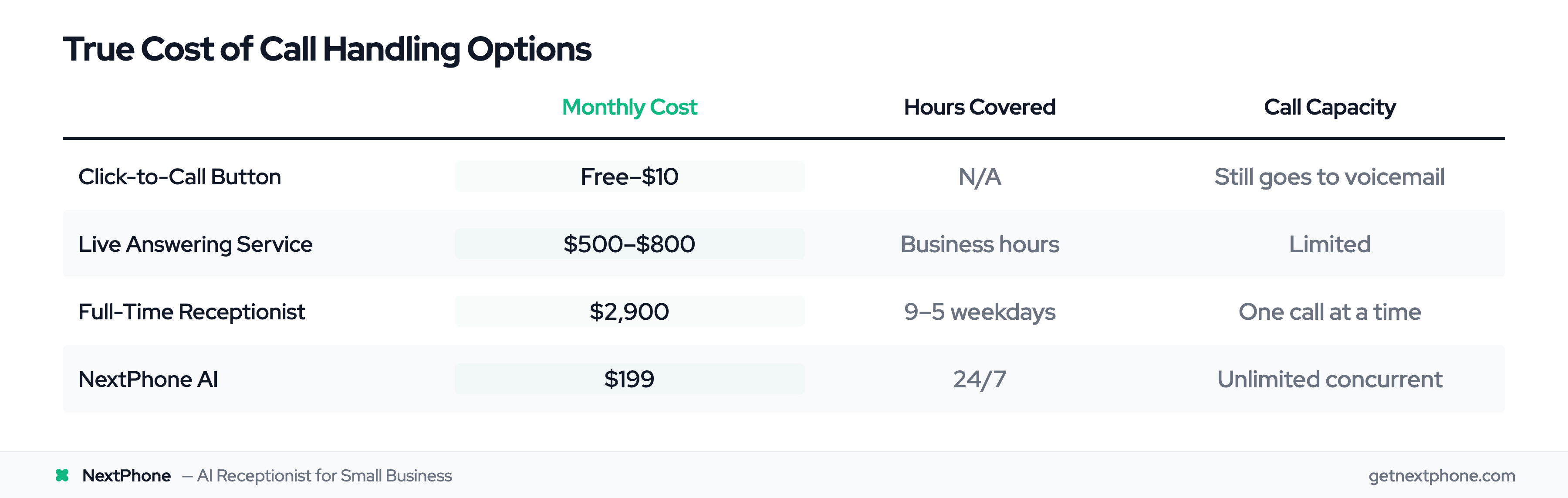
Traditional answering services charge $500-800/month for limited hours. In-house receptionists cost $35,000/year and only work 9-5. AI answers every call, every time, for a fraction of the cost.
How to Add NextPhone to Your Squarespace Site
Widget Installation Takes 5 Minutes
Adding NextPhone to your Squarespace site is as simple as adding any widget. No coding knowledge required.
Step 1: Sign up for NextPhone and get your unique widget code.
Step 2: In your Squarespace dashboard, go to Settings → Advanced → Code Injection.
Step 3: Paste the NextPhone widget code in the Footer section.
Step 4: Click Save and publish your changes.
The widget appears on your site immediately. Mobile-responsive, professional-looking, ready to handle calls.
AI Learns from Your Existing Site
Here's where it gets simple: NextPhone's AI automatically analyzes your Squarespace website. It extracts your business information—services you offer, operating hours, service areas, contact details.
You don't rebuild your entire website or rewrite service descriptions. The AI reads what you already have.
Then you customize the conversation flow: What should the AI ask callers? How should it qualify leads? What counts as an emergency that should route to your phone immediately?
Even if you're not tech-savvy, the setup is straightforward. If you can copy and paste, you can install NextPhone.