
Dispatch Smarter with GPS-Based Call Routing
Customer calls with an emergency HVAC repair. You have five technicians in the field. Who do you send?
Without fleet data, you guess. "Let me check who's available..." You call or text each tech. Five minutes later, you assign someone who's 30 minutes away—when another tech was 10 minutes from the customer.
Samsara tracks your fleet in real-time—GPS locations, route status, job completion. But that data doesn't automatically connect to your incoming calls.
With NextPhone + Samsara integration, emergency calls can trigger smart routing: AI checks which technicians are nearby, idle, and available, then dispatches the closest one. 85% of customer service leaders are exploring or piloting conversational GenAI in 2025—fleet integration is the next frontier. Faster response times, happier customers, more efficient fleet use.
Why Integrate Your Phone System with Samsara
Fleet-based service businesses (HVAC, plumbing, electrical, landscaping run on efficiency. 62% of calls to home service businesses go unanswered—and when calls do connect, sending the wrong truck wastes time and fuel.
Route to Nearest Technician
Traditional dispatch:
- Call comes in for emergency repair
- Dispatcher looks at board or calls techs: "Where are you?"
- Guesses who's closest
- Assigns job
- Tech drives 25 minutes when another tech was 8 minutes away
With Samsara integration:
- Call comes in
- NextPhone queries Samsara API for tech locations
- Identifies nearest available tech via GPS
- Auto-assigns or suggests to dispatcher
- Tech gets job notification
- Customer gets accurate ETA
Result: Faster response, lower fuel costs, more jobs completed per day.
Reduce Empty Drive Time
Every minute a tech spends driving between jobs is a minute they're not billing. GPS-based routing minimizes drive time.
Example: Tech finishes job at Location A. Call comes in from Location B (5 miles away) and Location C (18 miles away). Samsara knows Tech is at Location A. NextPhone routes Location B call to that tech, Location C to someone closer.
Over a month, this saves hours of drive time = more billable hours.
Track Call-to-Job Pipeline
Samsara tracks job completion. NextPhone tracks calls. Integration connects them.
You can see:
- Which calls turned into jobs
- How long from call to dispatch
- Which techs handle which call types
- Response time metrics by technician
Data drives optimization. "Tech #3 has fastest response time on plumbing calls—prioritize those for him."
How NextPhone + Samsara Integration Works
Samsara has APIs for vehicle tracking, driver info, and route data. NextPhone queries this data when routing calls.
The Integration Flow
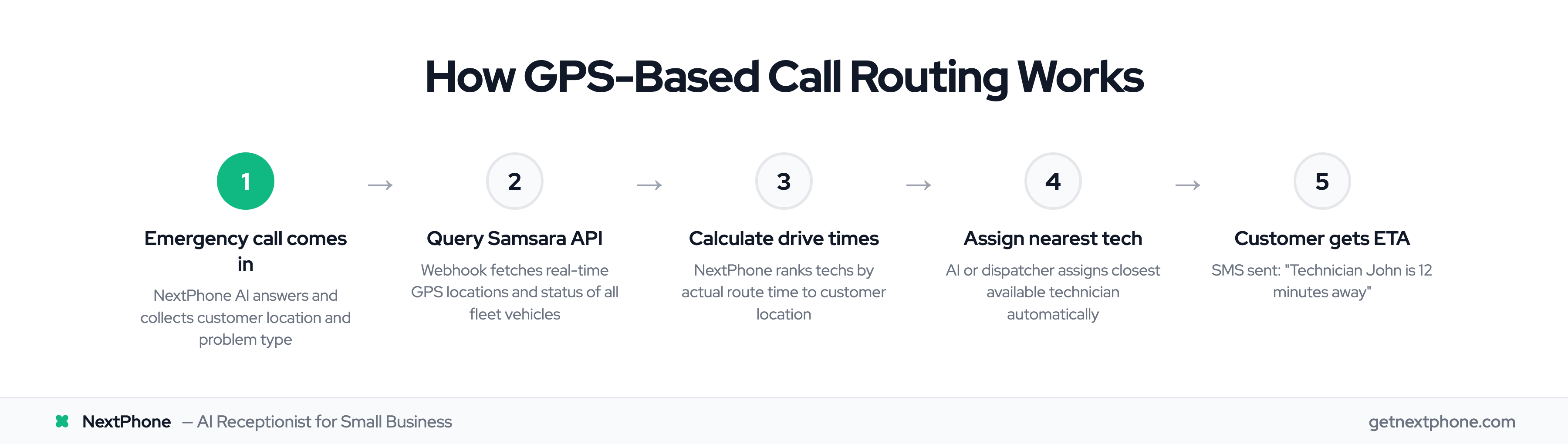
- Emergency call comes in — NextPhone AI answers
- AI collects: Customer location, problem type, urgency
- During or after call, webhook queries Samsara API: "Which techs are nearby and available?"
- Samsara returns: GPS locations of all fleet vehicles, current status (en route, idle, on job)
- NextPhone calculates: Drive time from each tech to customer location
- AI or dispatcher assigns nearest tech
- Notification sent to tech via Samsara device or SMS
- Customer gets SMS: "Technician John is 12 minutes away"
All automated. No manual GPS checking. 65% of businesses now use AI in their operations—this integration is how service companies catch up.
What Data Gets Shared
From NextPhone to Samsara:
- Call details (customer name, location, problem)
- Job priority (emergency vs routine)
- Timestamp
From Samsara to NextPhone:
- Vehicle locations (GPS coordinates)
- Driver/technician names
- Current status (available, busy, en route)
- Estimated drive times
This bidirectional data flow enables smart routing.
Setup Guide: Connect NextPhone to Samsara
Step 1: Get Samsara API Access
Log into Samsara dashboard — Admin — API Tokens. Generate a new API token with permissions:
- Read vehicle locations
- Read driver info
- Create jobs (if auto-dispatching)
Copy the API token.
Step 2: Configure NextPhone to Query Samsara
In NextPhone — Integrations — Custom Functions — Add New.
Function Name: "Find Nearest Tech"
Trigger: "Before routing call"
API Call:
- Method: GET
- URL:
https://api.samsara.com/v1/fleet/vehicles/locations - Headers:
Authorization: Bearer YOUR_SAMSARA_API_TOKEN
Response Processing: Parse GPS locations and calculate distances to customer location.
Step 3: Set Up Call Routing Logic
Configure NextPhone's routing rules:
- Emergency calls: Auto-assign to nearest available tech
- Routine calls: Suggest 3 nearest techs, let dispatcher choose
- Scheduled calls: Add to queue for manual assignment
Step 4: Test with Sample Call
Make test call with customer location. Check that NextPhone queries Samsara and identifies nearest tech correctly.
