Stop Planning Routes Around Phone Calls
You're running a delivery service. You've optimized today's route—12 stops, minimal backtracking, done by 4 PM.
At 10 AM, a customer calls: "Can I get a delivery today?" You say yes, manually add them to your list, and now you're driving across town and back because you inserted them between stops 6 and 7 when they should've been stop 3.
Route4Me optimizes multi-stop routes. But it can't automatically add stops from phone calls unless you manually enter them.
With NextPhone + Route4Me integration, appointment requests via phone automatically become optimized route stops. AI collects the address, creates the stop in Route4Me, and recalculates the best sequence. No manual entry, no inefficient routing.
Why Integrate Your Phone System with Route4Me
Businesses that make multiple stops per day need route optimization. Random stop order wastes time and fuel.
Add Stops Without Breaking Your Route
Traditional process:
- Customer calls requesting service/delivery
- You write down address on notepad
- Later, you manually add it to Route4Me
- Route gets re-optimized (if you remember)
- Often, new stops just get tacked onto the end
With integration:
- Call comes in — AI collects address
- Stop added to Route4Me automatically
- Route re-optimizes to fit new stop in best position
- Driver sees updated route on mobile app
Result: New stops don't break your route efficiency.
Perfect for Same-Day Appointment Requests
Field service businesses (lawn care, pool maintenance, mobile detailing) get same-day requests. "Can you come today?" Research shows 62% of calls to home service businesses go unanswered—those missed calls often represent same-day revenue.
If you say yes and manually add them, they might be stop 8 when they should've been stop 3 based on location. Integration ensures new stops get inserted at the most efficient point in the route.
Track Appointment Source
Route4Me stops created from phone calls can be tagged differently than pre-scheduled stops.
This lets you track:
- How many same-day phone requests vs planned appointments
- Which routes have phone-sourced stops
- Conversion rate of phone appointments to completed jobs
Data helps you optimize your sales and scheduling processes.
How NextPhone + Route4Me Integration Works
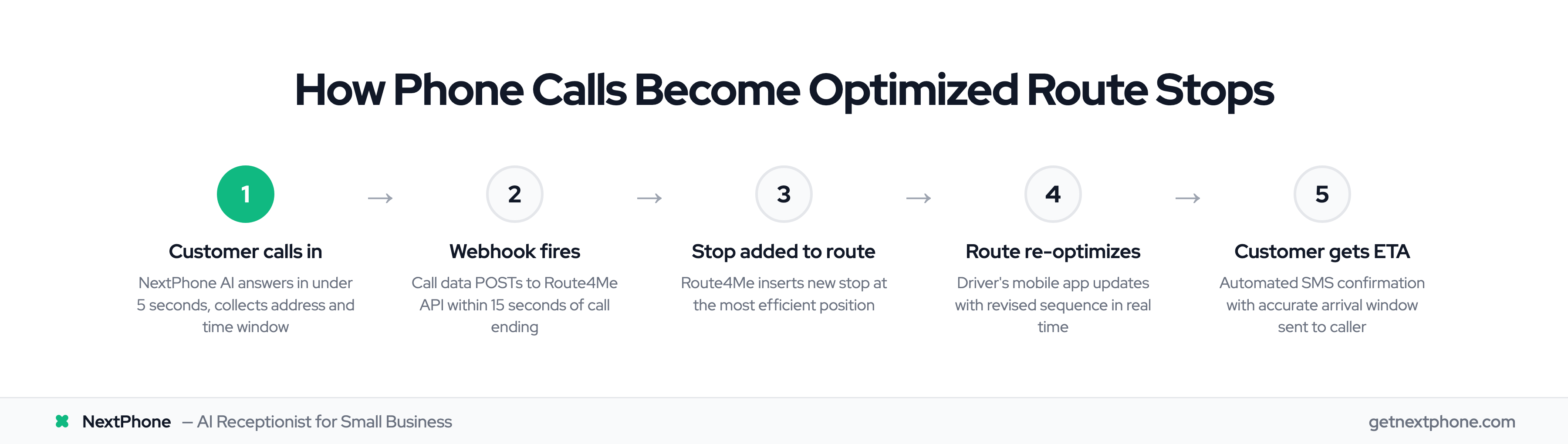
Route4Me has an API for creating routes, adding stops, and optimizing sequences. NextPhone sends call data to create new stops. 85% of customer service leaders are exploring or piloting conversational GenAI in 2025—this integration puts you ahead of that curve.
The Integration Flow
- Call comes in requesting appointment/delivery
- NextPhone AI asks: "What's your address?"
- Customer provides address
- AI asks: "When do you need this?" (Customer: "Today if possible")
- Call ends — Webhook fires
- POST request to Route4Me API creates new stop with:
- Address
- Customer name and phone
- Service type
- Time window (if specified)
- Route4Me re-optimizes route with new stop
- Driver sees updated route on mobile app
- Customer gets SMS confirmation with ETA
Total time: Under 15 seconds from call end to updated route.
What Data Gets Synced
To Route4Me:
- Stop address (collected during call)
- Customer name and phone
- Service notes (what they need)
- Time window (ASAP, afternoon only, before 2 PM, etc.)
- Priority level (emergency, standard, flexible)
From Route4Me:
- Current route status
- Estimated arrival time for customer
- Driver assigned to stop
This data flows both ways for complete visibility.
Setup Guide: Connect NextPhone to Route4Me
Step 1: Get Route4Me API Key
Log into Route4Me — Account — API — Generate new API key. Copy it.
Step 2: Configure NextPhone Webhook
In NextPhone — Integrations — HTTP Webhooks — Add New.
Settings:
- Name: "Route4Me Stop Creation"
- Trigger: "After call ends (if appointment scheduled)"
- Method: POST
- URL:
https://api.route4me.com/api.v4/optimization_problem.php
Headers:
api_key: YOUR_ROUTE4ME_API_KEY
Content-Type: application/json
Body Template:
{
  "addresses": [
    {
      "address": "[customer_address]",
      "alias": "[customer_name]",
      "phone_number": "[caller_number]",
      "time_window_start": "[time_window_start]",
      "time_window_end": "[time_window_end]",
      "notes": "[service_notes]"
    }
  ],
  "optimize": "Distance",
  "device_type": "web"
}
Step 3: Configure AI to Collect Address
Tell NextPhone AI to ask:
- "What's the full address where you need service?"
- "When would you like us to come—morning or afternoon?"
- "Is there anything specific we should know?"
AI extracts: address, time preference, service notes.
Step 4: Test
Make a test call, provide address, end call. Check Route4Me—new stop should appear and route should re-optimize.