
You've run the numbers. An AI receptionist would save you $35,000 a year compared to a traditional full-time receptionist. You're missing 74% of your calls right now. The ROI is obvious.
But here's what keeps you up at night: What if the transition disrupts your business? What if the AI messes up during your busy season? What if customers get frustrated and never call back?
You're stuck between two bad options - keep bleeding money and missing calls, or risk your reputation on an overnight technology switch.
There's a third option. The 1,446,980 business calls in our analysis point to a zero-disruption onboarding strategy that lets you implement a voice AI receptionist gradually, test thoroughly, and maintain full control at every stage. No big bang. No crossed fingers. No disruption.
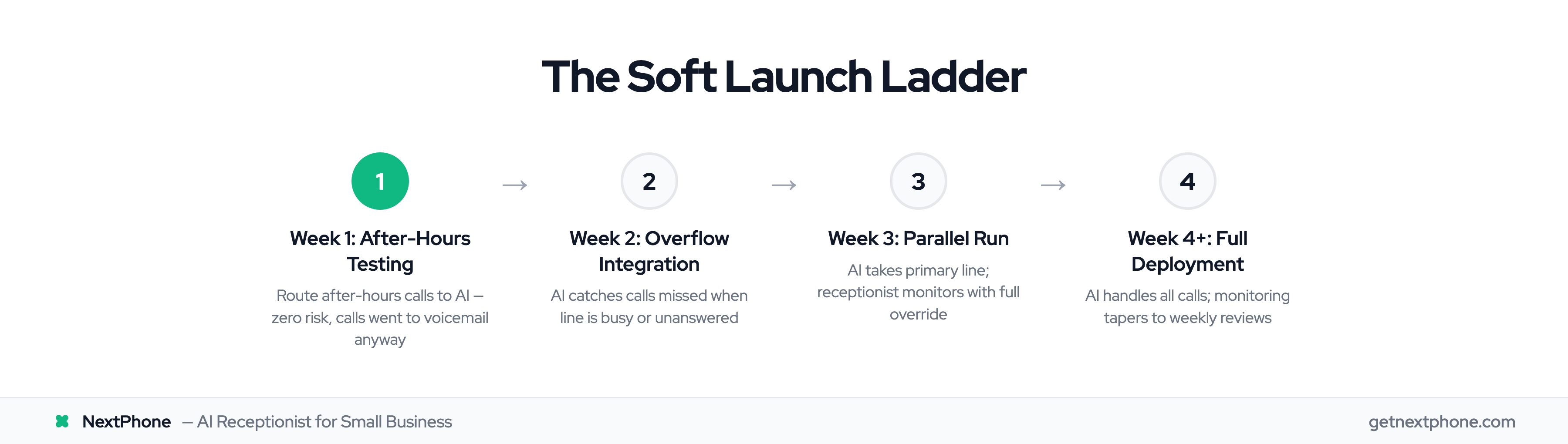
Here's your 4-week roadmap to onboard AI without disrupting business.
Why the "Soft Launch Ladder" Works
Most businesses treat AI receptionist deployment like flipping a light switch. Friday, your human receptionist answers calls. Monday, the AI takes over. And by Tuesday, you're dealing with confused customers and a stressed team.
Research from Gartner shows that organizations using phased rollout strategies have 3x higher success rates than those using "big bang" implementations. Industry data shows SMBs average 90 days from pilot to full implementation for AI deployments. The reason? You catch problems when the stakes are low, build confidence progressively, and give everyone time to adjust.
The Ladder Approach
Think of AI onboarding as climbing a ladder. Each rung is a low-risk testing environment where failure has minimal consequences.
You start at ground level - after-hours calls that already go to voicemail. Then you climb to overflow calls that would otherwise be missed. Next, you run AI parallel with your human receptionist as a safety net. Finally, you reach the top with full deployment.
Here's the key: you only advance to the next rung when you've proven success at the current level. If something isn't working, you stay put or step back down. You're always in control.
Pre-Onboarding Preparation (Week 0)
Before you forward a single call to AI, you need to know what success looks like for your business. Businesses with documented continuity plans are 2.5x more likely to survive disruptions - and yes, a bad AI deployment is a disruption.
Assess Your Current State
Spend one week documenting your baseline. Log your total call volume and note the patterns. When do most calls come in? How many calls arrive after hours? What about when your line is busy?
Track your common call types. Are most calls appointment scheduling? Price quotes? Emergency service requests? Technical questions? You need to know what your AI will be handling before it starts handling it.
Don't skip the seasonal analysis. If you're in HVAC, landscaping, or pool service, your call patterns in January look nothing like July. Plan your onboarding for a shoulder season if possible, not peak madness.
Set Success Metrics
Your AI needs clear targets. Define these four metrics right now:
Answer rate: What percentage of calls should the AI actually pick up? Aim for 95%+ after-hours and 90%+ during business hours.
Response quality: How will you measure if the AI gave good information? Plan to spot-check 20 calls per week and score them. Accurate information captured, customer question answered, appropriate next steps provided.
Customer satisfaction: How will you know if callers are happy? Set up a simple follow-up process - call back 10 customers per week and ask about their AI experience.
Emergency handling: This is non-negotiable. True emergencies are a recurring reason people call, so your AI must route these perfectly. Test this extensively before going live during business hours.
Choose the Right AI Platform
Not all AI receptionists are built for smooth onboarding. Look for platforms with easy rollback capabilities, real-time monitoring dashboards, and customization without coding.
You need to see what the AI is doing in real-time. You need to be able to adjust scripts without calling a developer. And you absolutely need a one-click "abort mission" button if things go sideways.
NextPhone built its platform specifically for zero-disruption onboarding. The real-time dashboard shows you every call as it happens. Emergency detection routes urgent calls to your backup immediately. And if you need to rollback at any stage, it's one click - no tech support ticket required.
The platform handles all three stages of soft launch natively: after-hours routing, overflow integration, and parallel run monitoring. You're not jerry-rigging a system meant for enterprise call centers. You're using a tool designed for exactly this transition.
Stage 1: After-Hours Testing (Week 1)
After-hours calls are your practice field. Right now, these calls go to voicemail and 74% go completely unanswered. You literally cannot do worse than what's happening now.
Why Start After-Hours
After-hours testing gives you a safe environment to work out the kinks. No pressure. No time constraints. No team coordination required yet. Just you, the AI, and callers who aren't expecting a human anyway.
You'll learn what questions the AI handles well and what trips it up. You'll discover how your actual customers phrase their requests. And you'll refine the scripts before anyone is watching.
Your team isn't involved at this stage, which removes a major variable. You're testing the technology, not your team's ability to work with it.
Week 1 Implementation Steps
Monday-Tuesday: Configure your AI with business basics. Name, address, hours, services offered, emergency protocols. Test it by calling yourself from different numbers. Have friends call. Pretend to be confused customers.
Wednesday: Forward your after-hours calls to the AI. This is usually a simple setting in your phone system - calls outside business hours route to your AI number instead of voicemail.
Thursday-Sunday: Monitor every single call. Listen to recordings. Read transcripts. Take notes on what worked and what didn't.
What to Monitor
Check your answer rate first. The AI should pick up 95%+ of after-hours calls. If it's lower, something's wrong with your routing setup.
Review call transcripts daily. Is the AI capturing accurate information? Are callers getting their questions answered? Are emergency calls flagged correctly?
Watch for confusion signals. Callers who say "Wait, am I talking to a robot?" or "Let me speak to a real person" aren't necessarily problems - but note how the AI handles it. Does it smoothly transition or fumble?
Track callback requests. If more than 5% of callers are saying "Just have someone call me back," the AI might be underperforming. After-hours callback requests are normal. Business hours callback requests during overflow and parallel stages signal a problem.
Advancement Criteria
You're ready for Stage 2 when you hit these marks:
- 95%+ of after-hours calls answered
- Less than 5% callback request rate
- No critical information missed or mishandled
- You're confident the AI can handle your most common call types
- Emergency calls are flagged correctly (test this explicitly)
If you're not there by day 7, stay in Stage 1 longer. There's no prize for speed. The prize is not disrupting your business.
Stage 2: Overflow Call Integration (Week 2)
Overflow calls are the next rung up the ladder. These are calls that come in when your line is busy or when nobody answers after 4-5 rings. Like after-hours calls, these would be missed anyway - you're still not replacing anyone yet.
The Overflow Strategy
Configure your phone system so the AI only catches calls that would otherwise fail. Your receptionist or team picks up the phone normally. But if they're already on a call, or if the phone rings 4-5 times with no answer, the call routes to AI instead of going to voicemail.
You're still in a zero-risk environment. The only difference? These calls happen during business hours, so they're more urgent and complex than after-hours inquiries.
Here's the psychology win: you're helping, not replacing. Your team sees the AI catching calls they would have missed anyway. It builds confidence instead of defensiveness.
Week 2 Implementation Steps
Monday-Tuesday: Set up overflow routing. Most phone systems let you specify "if busy" or "if no answer after X rings" routing rules. Point these to your AI.
Test the trigger. Have someone call while your main line is busy. Have someone call and let it ring without picking up. Verify the AI catches both scenarios.
Wednesday-Sunday: Run overflow routing and monitor closely. You're now seeing how the AI handles business-hours call types with real urgency.
What's Different in Overflow vs After-Hours
Overflow calls hit differently. Customers expect immediate help. They might be calling about an emergency or urgent appointment. The stakes are higher.
Watch for urgency detection. Calls with urgency language ("emergency," "urgent," "ASAP") rank among the top reasons people call. Your AI needs to recognize this and either handle it appropriately or route to a human immediately.
Appointment scheduling gets more complex during business hours. People want specific times, ask about availability, and request confirmation. Make sure your AI captures all the details correctly.
Technical questions spike during overflow. Customers calling about specific service issues, price quotes, or detailed information. Note which question types the AI handles smoothly and which ones it struggles with.
Advancement Criteria
Move to Stage 3 when you see:
- 90%+ answer rate on overflow calls
- Common request types handled correctly (appointments, quotes, callbacks)
- Emergency detection working reliably
- Zero customer complaints about the AI experience
- Your team is aware of what's coming next and prepared
That last point is crucial. Before you start the parallel run, your team needs to know the plan. Which brings us to team communication.
Team Communication Strategy
Here's an uncomfortable truth: 70% of change programs fail due to employee resistance and lack of management support, according to McKinsey research. The technology works. The people part is what breaks.
Your receptionist probably thinks they're being replaced. Your team doesn't know when to let the AI handle calls versus jumping in. Nobody's sure what happens to jobs and roles.
Address this head-on before Stage 3.
The Staff Announcement (Before Week 3)
Don't spring the parallel run on your team. Have a clear conversation at least a few days before Week 3 begins.
Here's a template you can adapt:
"We're implementing AI phone answering to catch the 74% of calls we currently miss. This isn't about replacement - we're adding capacity so we never lose customers to voicemail again. We've been testing it after-hours and on overflow for two weeks, and it's working well. Starting next week, we're running a parallel test where the AI answers calls while [receptionist name] monitors quality. This helps us ensure the AI is ready before we make any changes to anyone's role. Here's what's happening and when..."
Addressing Job Security Concerns
Be honest about what's happening. If your plan is to transition your receptionist to other duties, say so and specify what those duties are. If you're reducing hours, explain the timeline and options. If someone is exiting, provide appropriate notice and support.
Many businesses use this as an opportunity to move receptionists to higher-value work. Customer follow-up, appointment confirmations, quality assurance, administrative projects that have been neglected. AI handles the repetitive call answering. Humans handle the relationship building.
Whatever your plan, communicate it clearly. Uncertainty breeds resistance. Clarity builds cooperation.
The New Role During Parallel Run
Your receptionist has a specific job during Week 3: quality assurance specialist. They're monitoring the AI's performance, noting issues, helping you decide if it's ready for prime time.
This isn't busywork. This is critical evaluation that determines whether your business makes a major operational change. Frame it that way.
Daily debriefs are essential. Morning: review yesterday's calls together. Midday: check for any issues. End of day: compare metrics and discuss improvements. Your receptionist's expertise is valuable - use it.
Stage 3: Parallel Run Period (Week 3)

The parallel run is where theory meets reality. The AI takes your primary line. Your human receptionist monitors with full override capability. You're testing at full scale, with a safety net.
This is the stage that catches problems before they become disasters. Research shows parallel testing catches 85% of critical issues before production deployment. Don't skip this stage. Don't rush through it.
Week 3 Setup
Configure your system so the AI answers all incoming calls. Your receptionist has live dashboard access to see every call in real-time. They can listen in. They can intervene if needed.
Activate the "press 0 for human" option. If anyone wants to speak to a person, they can reach your receptionist immediately. This is your psychological safety net for customers and your team.
Set up automatic routing for flagged emergency calls. The AI should detect emergency language and immediately transfer to your receptionist or on-call technician. Test this thoroughly - true emergencies are a recurring reason people call, and you cannot afford a failure here.
What to Compare
You're running a direct comparison test. How does AI performance stack up against your previous human answering?
Answer rate: Is the AI picking up calls faster? Answering more total calls? Track the numbers daily.
Call duration: AI typically handles calls faster - our data shows under 2 seconds to answer versus 30+ seconds for traditional services. But make sure "faster" doesn't mean "incomplete." Spot-check that all information is captured.
Information accuracy: Pull 20 random calls each day. Did the AI get the details right? Was the correct information provided? Were appropriate next steps established?
Customer satisfaction: This is harder to measure in real-time, but critical. Call back 10 customers per day and ask: "How was your experience when you called? Did you get the help you needed?" You're listening for confusion, frustration, or praise.
Emergency handling: Review every single call flagged as an emergency. Was it routed correctly? Did the right person receive it? How fast was response? This metric needs 100% accuracy.
Daily Routine
Your morning starts with a call review meeting. You and your receptionist sit down with yesterday's dashboard. What worked? What didn't? What patterns are emerging?
Midday check-in: quick pulse on the current day. Any issues? Any calls that needed human intervention? What triggered the intervention?
End-of-day metrics comparison: pull the numbers. AI vs human benchmarks. Are you trending toward full deployment criteria, or do you need more time?
Advancement Criteria
You're ready to transition to full AI deployment when:
- AI matches or exceeds your previous human answer rate
- Emergency calls are routed correctly 100% of the time
- Customer satisfaction scores are equal to or better than before
- Your team is confident in the AI's performance
- You've had zero "AI failed and we lost a customer" incidents
Red Flags to Extend Parallel Run
Stay in parallel run longer if you see:
- Recurring AI mistakes on the same call types (it's not learning/improving)
- Any emergency misrouting
- Rising customer complaints or confusion
- Team anxiety is still high (they don't trust it yet)
- You personally don't feel confident
This stage costs you very little - you're running what you'd run anyway. The cost of moving too fast is much higher than the cost of an extra week of parallel testing.