
Your Phone Is Ringing. Are You Really Answering It?
Your phone rings at 7 PM. A homeowner needs a quote for a kitchen remodel - they're calling three contractors and going with whoever answers first. Your Grasshopper number forwards to your cell, but you're at your kid's soccer game. The call goes to voicemail. They call the next contractor who answers in 5 seconds. You just lost a $14,500 job and didn't even know you were competing for it.
This happens more than you think. In our analysis of 130,175 calls from 45 home services contractors over 7 months, 74.1% of calls went completely unanswered. That's three out of every four potential customers calling someone else.
Grasshopper is a solid virtual phone system for forwarding calls and managing voicemails. But it can't actually answer your phone when you're busy, on a job site, or after hours. If you're ready for something that does more than just forward calls - something that actually handles them - here's your complete guide to migrating from Grasshopper to an AI voice receptionist in under two weeks.
See how AI handles calls Grasshopper can't —
Why Small Businesses Are Leaving Grasshopper
What Grasshopper Does (And Doesn't Do)
Grasshopper is a virtual phone system designed for solopreneurs and small teams. Since 2003, Grasshopper has served over 400,000 customers. You get a business number, custom voicemail greetings, call forwarding to your cell, and basic extensions. For a one-person operation, that's enough.
But here's what Grasshopper doesn't do: it doesn't answer your calls. It forwards them to your phone or sends them to voicemail. If you're in a meeting, on a ladder, or helping a customer in front of you, that call goes unanswered. The system can't book appointments, answer questions, or capture lead information. It's a routing system, not a receptionist.
The Hidden Cost Problem
Grasshopper advertises budget plans that sound affordable. The base tier gives you one number and three extensions. Sounds cheap until you realize what's missing.
Need more extensions? Extra monthly cost each. Want additional phone numbers? More added per number. According to CloudTalk's pricing analysis, Grasshopper's base plans easily cost $60-100 a month once basic add-ons are applied. And if you add Grasshopper's live receptionist service (Ruby), you're paying $245 per month for just 50 receptionist minutes.
The advertised low price turns into $60-100 monthly fast. You're paying for call forwarding at the cost of an answering service.
Missing Features That Matter
As your business grows, Grasshopper's limitations become obvious. There's no call recording - even though most modern phone systems include this as standard. You can't integrate with your CRM. According to user reviews, Grasshopper offers virtually no way to connect with platforms like Salesforce, HubSpot, or Zoho, and there's no API for custom integrations.
Here's the biggest problem: Grasshopper doesn't allow users to export or backup text messages, and they claim to delete all text message history right after numbers are ported out. If you have important customer conversations in your SMS inbox, you'll lose them permanently during migration unless you screenshot everything manually.
You're not getting more features as your business grows. You're hitting a ceiling.
Why AI Voice Is the Next Evolution (Not Just Another VoIP)
What AI Voice Actually Does
An AI voice receptionist doesn't just forward your calls to another number. It answers them - actually picks up the phone and has a conversation with your caller.
Using natural language processing, the AI understands questions like "Are you open today?" or "Do you service my area?" or "How much do you charge for a bathroom remodel?" It can answer based on your business information, book appointments by checking your calendar, and take detailed messages that go straight to your email or CRM.
When a caller says "this is an emergency," the AI detects urgency and transfers the call to your cell phone immediately - while they're still on the line. No voicemail, no callback delays.
The 24/7 Coverage Advantage
Grasshopper forwards calls whenever they come in, but if you don't answer, the caller hits voicemail. An AI receptionist answers every single call, 24 hours a day, 7 days a week.
Why does this matter? Our call data showed that 73% of calls to home services businesses happen outside standard 9-5 hours. That's evenings, weekends, and early mornings when people are home and thinking about their projects. With just call forwarding, those calls go to voicemail. With AI, they're answered and handled.
In our study of 2,487 customer interactions, 25.4% of callers explicitly requested callbacks. Without a system to track and follow up on those requests, most of them never get called back. An AI receptionist logs every callback request, sends you an instant notification, and even reminds you if you haven't responded.
Intelligence Grasshopper Can't Match
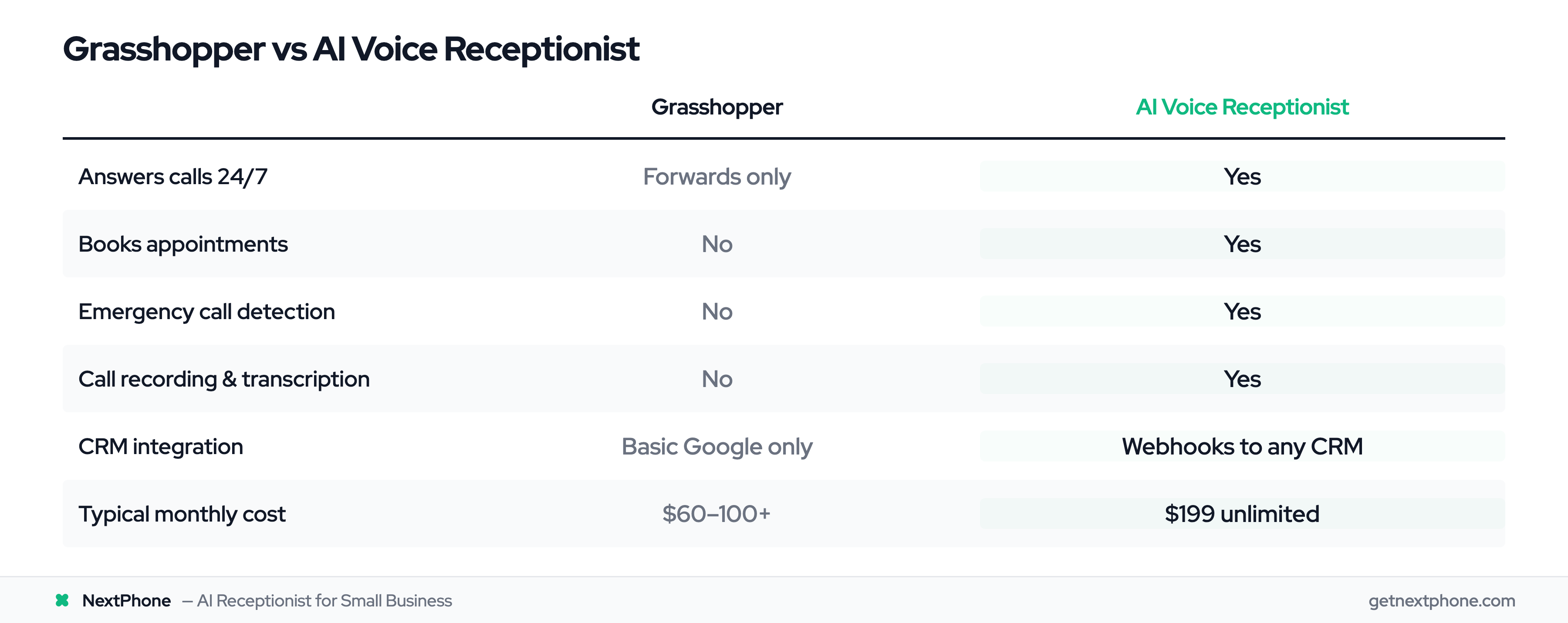
Here's where AI pulls ahead: it learns your business and handles calls intelligently.
We found that 15.9% of calls contained urgency language like "emergency," "urgent," or "ASAP." For home services contractors, these emergency calls average $4,200 in revenue - significantly higher than routine work. An AI receptionist detects these calls and routes them to you immediately, even during a conversation. Grasshopper just forwards to voicemail if you don't pick up.
AI also integrates with your existing tools. It can push lead information directly into your CRM the second a call ends. It can send follow-up text messages with your booking link. It can trigger email notifications with call summaries and transcripts. According to industry research on AI answering services, AI receptionists typically cost between $50 and $300 per month - and they do the work of a full-time receptionist who would cost $35,000 per year.
Grasshopper doesn't offer any of this. It's a phone number with forwarding. AI is an actual receptionist.
| Feature | Grasshopper | AI Voice Receptionist |
|---|---|---|
| Answers calls 24/7 | L (forwards only) | ✓ |
| Books appointments | L | ✓ |
| CRM integration | L (basic Google only) | ✓ (webhooks to any CRM) |
| Emergency call detection | L | ✓ |
| Call recording & transcription | L | ✓ |
| Voicemail transcription | ✓ | ✓ |
| Callback request tracking | L | ✓ |
| Live call transfer | ✓ | ✓ |
Pre-Migration Checklist: What You Need Before You Start
Critical First Step: Backup Your Data
Before you do anything else, backup your Grasshopper data. This is not optional.
Grasshopper doesn't allow users to export or backup text messages, and they delete all message history immediately after your number is ported out. Once the port completes, that data is gone forever with no way to recover it.
Here's what to save before you start:
- Screenshot any important SMS conversations
- Export your contacts list manually (copy to spreadsheet or CRM)
- Save voicemails you need to keep (play and record them to your computer or phone)
- Document any custom greetings or messages you've created
- Note your current call forwarding settings and routing rules
Take an hour to do this properly. You'll thank yourself later.
Gather Required Documents
According to the Federal Communications Commission (FCC), you have the right to keep your phone number when switching providers. The porting process requires specific documentation to prove you own the number you're transferring.
You'll need:
- Recent phone bill: Must be dated within the last 30 days, showing your Grasshopper account
- Account number: Your Grasshopper account ID (found in your account settings)
- Account PIN: If you set one up, you'll need it for authorization
- List of all numbers: Include every phone number you want to port (local, toll-free, etc.)
- Letter of Authorization (LOA): Your new provider will provide this template - you sign it to authorize the transfer
Your business name and address on the LOA must exactly match what's on your Grasshopper account. Any mismatch will delay or reject the port request.
Choose Your Migration Date
Porting typically takes 5-10 business days, but you need buffer time on both ends. Don't start this process the week before your busiest season or during a major project deadline.
Give yourself at least 2-3 weeks from submission to go-live. That accounts for document gathering, processing time, and any unexpected delays. Avoid porting during holidays, as carrier processing can slow down.
Choose a date when you can dedicate time to testing and setup. You'll want to test your new AI system thoroughly once the port completes, and you don't want to do that while you're juggling other priorities.
Step-by-Step Migration Process (Days 1-14)
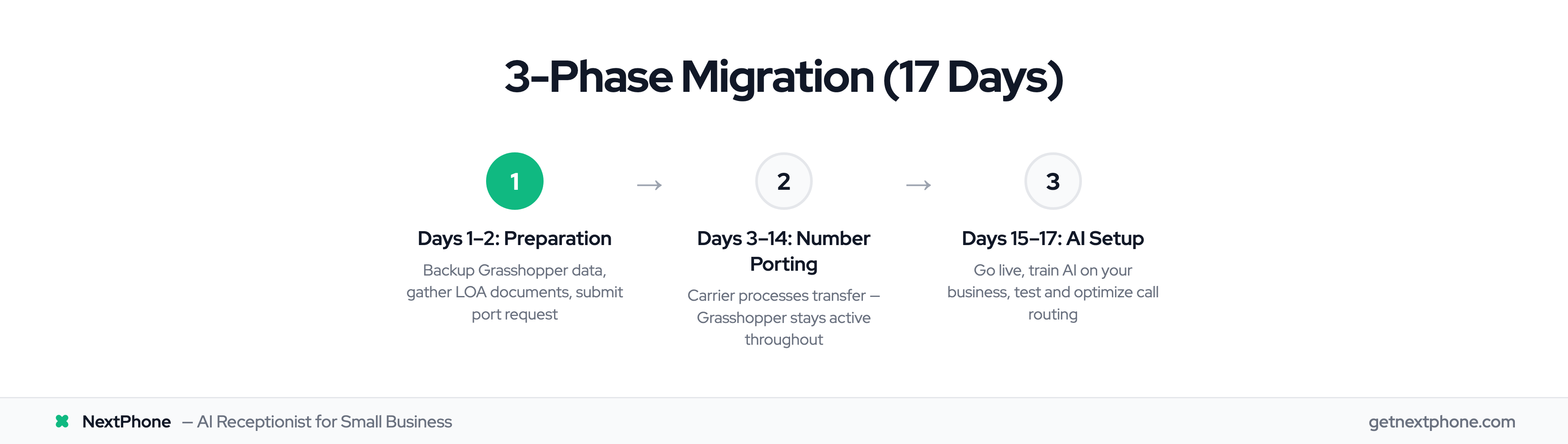
Days 1-2: Preparation Phase
Start by backing up your Grasshopper data using the checklist above. Screenshot messages, save voicemails, export contacts.
Next, gather your required documents: recent phone bill, account number, and account PIN if applicable. Create a list of all phone numbers you want to port from Grasshopper to your new system.
Sign up for your NextPhone account and submit your port request. You'll fill out the Letter of Authorization with your information, attach your Grasshopper phone bill, and submit everything through the NextPhone dashboard. The entire submission process takes about 15 minutes.
Day 3: Submit Port Request
NextPhone submits your port request to the carrier along with your Letter of Authorization and supporting documents. The carrier begins automatic validation checks - confirming that your information matches Grasshopper's records, that the account is active and in good standing, and that you're authorized to port the number.
You'll receive a confirmation email with an estimated completion date, typically 7-12 business days from submission. This email includes a reference number for tracking your port status.
One critical rule: do not cancel your Grasshopper service yet. Your account must stay active throughout the entire porting process or the request will fail.
Days 4-14: Processing and Approval
The carrier processes your request over the next 5-10 business days. According to porting guides, the typical timeline is 2-4 weeks for VoIP number porting, but with automation improvements in 2025, most ports complete faster.
During this time:
- The carrier contacts Grasshopper to coordinate the transfer
- Grasshopper verifies your account information and confirms the port request
- The carrier schedules a specific date and time for the number to switch over
- You receive status update emails from NextPhone
- Your Grasshopper service continues working normally
This is a good time to start setting up your AI knowledge base in NextPhone (we'll cover that in the next section). You can train your AI, configure call routing rules, and prepare for go-live while the port is processing in the background.
Do NOT cancel Grasshopper yet - even if you get impatient waiting. Canceling your account before the port completes will cause the request to fail, and you'll have to start the entire process over.
Day 15: Go-Live
Porting typically completes early in the morning (between 12 AM and 6 AM local time). One minute, calls to your number go to Grasshopper. The next minute, they go to NextPhone. The switch is instantaneous.
You'll receive a confirmation email from NextPhone that the port is complete. Test it immediately:
- Call your ported number from another phone
- Verify that NextPhone AI answers
- Test a few common questions to confirm the AI responds correctly
- Check that emergency keywords trigger call transfer to your cell
- Confirm you're receiving email notifications for calls
Once you've tested and confirmed everything is working, you can now safely cancel your Grasshopper service. Most providers recommend waiting 24-48 hours after go-live before canceling, just to ensure there are no issues.
Your migration is complete. Your customers call the same number they always have, but now an AI receptionist answers instead of forwarding to voicemail.
Post-Migration: Setting Up Your AI Receptionist
Training Your AI (Hours, Services, FAQs)
Your AI needs to know about your business to answer questions accurately. This takes 15-30 minutes to set up and makes the difference between a helpful receptionist and a confused robot.
Start with the basics:
- Business hours: When are you open? Include special hours for holidays or seasonal changes
- Services offered: What do you do? List your main services (kitchen remodeling, electrical repairs, HVAC installation, etc.)
- Service area: Where do you work? Be specific - name cities, counties, or zip codes you cover
- Pricing: If you share price ranges, add them. If you prefer to quote on-site, tell the AI to say "we provide free estimates"
- Common FAQs: Do you offer free estimates? Are you licensed and insured? How soon can you come out?
Upload this information to your NextPhone knowledge base. The AI uses it to answer caller questions instantly and accurately. A homeowner calls at 8 PM asking "Do you install tankless water heaters?" and gets an immediate yes or no based on your services list.
Setting Up Call Routing Rules
This is where AI gets powerful. You define rules for how different types of calls should be handled.
For emergency calls, set up emergency keywords specific to your industry. An HVAC contractor might use "no heat," "no cooling," "furnace out," or "AC died." When the AI detects these phrases, it immediately transfers the call to your cell phone while the customer is still on the line.
Our call analysis showed that 15.9% of calls contain urgency language. For these high-value emergency calls averaging $4,200 in revenue, you can't afford to let them hit voicemail. Set up your emergency routing rules so you never miss these calls.
For routine calls, decide whether the AI should:
- Take a message and send you an email
- Book an appointment directly on your calendar
- Transfer to your phone if you're available
- Collect lead information and push it to your CRM
You can set different rules for business hours vs after-hours. During the day, maybe you want non-urgent calls to transfer to your phone. After 6 PM, maybe you want the AI to handle everything except emergencies.
Remember: 25.4% of callers explicitly request callbacks. Make sure your AI logs these requests, sends you a notification, and even reminds you if you haven't followed up.
Testing and Optimization
Before you announce your new system to the world, test it thoroughly. Call your number 5-10 times with different scenarios:
- Call during business hours and ask about services
- Call after hours and request an estimate
- Ask if you service a specific area (both yes and no scenarios)
- Say "this is an emergency" and verify it transfers to your cell
- Request a callback and check that you receive the notification
- Ask a question the AI might not know and see how it handles uncertainty
Adjust based on how it performs. If the AI gives a wrong answer, update your knowledge base. If emergency transfers aren't working, check your keyword list. If messages aren't reaching you, verify your notification settings.
This testing phase is critical. A poorly trained AI that gives wrong information is worse than voicemail. Spend an hour testing different scenarios until you're confident in the responses.