GoTo Connect + NextPhone: Unified Communications Integration

15 min read
Yanis Mellata
AI Technology

Introduction

Your phone rings. You're in an attic running electrical wire, hands full, no way to answer. A customer needs an emergency repair—their power's out. The call goes to voicemail. They don't leave a message. They call the next electrician. You just lost a $4,200 job.

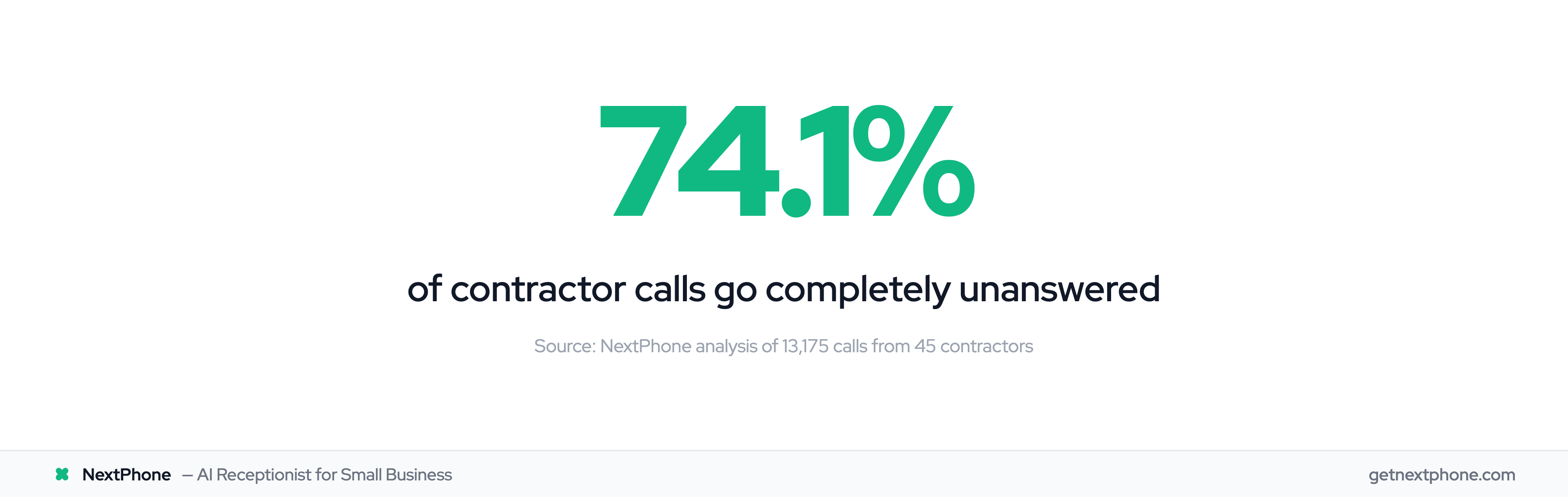
This happens more than you think. In our analysis of 13,175 customer service calls from 45 home services contractors over 7 months, 74.1% of calls went completely unanswered. That's three out of every four potential customers calling someone else.

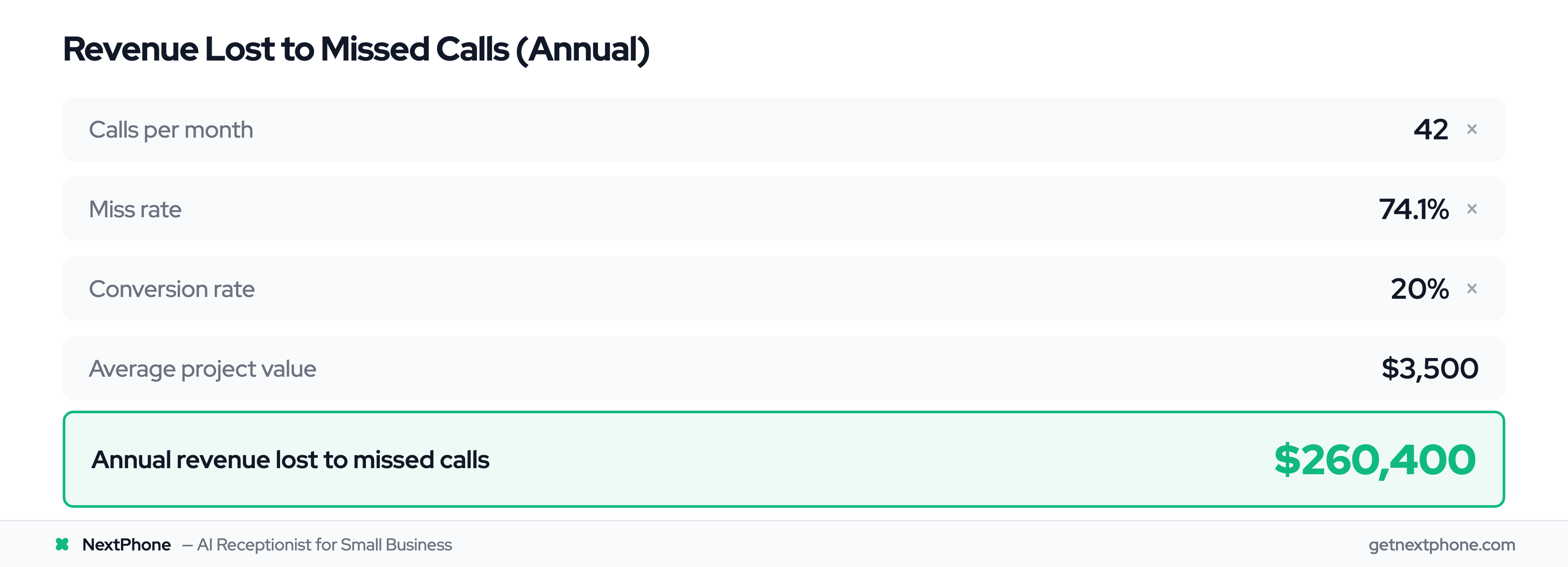
For a contractor averaging 42 calls per month, that's 31 missed opportunities worth $260,400 per year in lost revenue. Having a phone system doesn't solve this problem—you need something that actually answers when you can't.

What is GoTo Connect?

GoTo Connect is a unified communications platform that combines everything you need to communicate with customers and your team. Instead of juggling separate systems for phone calls, video meetings, and messaging, GoTo Connect puts it all in one place.

UCaaS Platform Overview

UCaaS stands for Unified Communications as a Service. What that means in practice: cloud-based phone system, video conferencing, team chat, and SMS all accessible from your desk phone, computer, or mobile device. No hardware to install or maintain—everything runs through the internet.

For small businesses, this eliminates the headache of managing multiple vendors and systems. Your receptionist uses the same platform your field crew uses to stay in touch with the office.

Core Communication Features

GoTo Connect delivers HD voice calling with professional features like call routing, auto attendants, and voicemail transcription. The video conferencing supports up to 250 participants with screen sharing and recording. Team messaging includes file sharing and group channels.

The platform also provides SMS capabilities so you can text customers directly from your business number. Call forwarding, hotdesking, and custom dial plans give you flexibility in how calls flow through your organization.

Why Integrations Matter for Small Businesses

Here's where GoTo Connect becomes more than just a phone system. Integration with your CRM means every customer call automatically logs in Salesforce or HubSpot. No more scribbling notes on paper or forgetting to update records.

When a customer calls, their information pops up on your screen. You see their purchase history, previous conversations, and any open tickets. After the call, everything syncs automatically. For a small team wearing multiple hats, this automation saves hours of manual data entry every week.

GoTo Connect Integration Capabilities

GoTo Connect supports integrations with the business tools you're already using. The GoTo App Integrations MarketPlace lists available connections, from major CRM platforms to productivity apps.

CRM Integrations

The platform connects with Salesforce, HubSpot, Zoho CRM, Zendesk, ConnectWise, Pipedrive, ServiceNow, and SugarCRM. These integrations sync contact information, log calls automatically, and provide click-to-dial from within your CRM interface.

In December 2025, GoTo added Monday.com integration, syncing call, message, and voicemail data automatically. Earlier in the year, they added PipeRun and Zoho Desk support. The integration list continues growing, though it remains focused on mainstream business platforms.

Productivity Tool Integrations

GoTo Connect works with Microsoft 365, Google Workspace, Microsoft Teams, and Slack. You can make calls directly from these applications without switching windows. Calendar integration means your availability status updates automatically when you're in a meeting.

The Microsoft Teams integration is particularly useful if your team already lives in that ecosystem. Calls, meetings, and chat all flow through familiar interfaces.

Automation via Zapier

The Zapier automation connection opens up thousands of workflow possibilities. Set up triggers based on call events—when a call ends, when you receive an SMS, when a voicemail arrives.

Actions include sending text messages, creating records in databases, or firing webhooks to custom systems. According to GoTo, most users get Zapier automation running in about 10 minutes. The interface is point-and-click, no coding required.

Example workflow: Call ends — Zapier captures details — Creates row in Google Sheets — Sends email notification to manager — Updates task in project management tool. Five apps connected with one automation.

API for Custom Integrations

For businesses with specific needs, the GoTo Developer Center provides API access. The GoTo Connect API now supports web calls, allowing developers to build browser-based softphone sessions.

The API documentation includes guides and sample code. GoTo offers dedicated API specialists to help with implementation for larger projects. This matters if you use industry-specific software that doesn't have pre-built integrations.

Pricing Tiers and Integration Access

GoTo Connect offers three pricing tiers, and your integration options depend on which plan you choose. This is where cost and functionality intersect.

Phone System Plan ($26/user/month)

The entry-level plan provides basic phone system features with limited integrations. You get Outlook and Google Chrome extensions, but that's about it for third-party connections. According to user reviews, "The basic plan comes with only basic integrations like Outlook and Google Chrome."

This plan works if you just need reliable calling and don't require CRM synchronization. For most businesses evaluating integration capabilities, you'll need to look at the higher tiers.

Connect CX Plan ($34/user/month)

This mid-tier plan unlocks the full CRM integrations. You get connections to Salesforce, HubSpot, Zoho, and other major platforms. The plan also includes WhatsApp and Facebook integration, shared inbox features, and an attendant console for managing multiple lines.

For an extra $8 per user monthly, you gain the integration capabilities that make unified communications actually unified. Most small businesses land here if they're serious about connecting their phone system to other tools.

Contact Center Plan ($80/user/month)

The top-tier plan includes everything from Connect CX plus advanced contact center features. AI chat analysis, automatic dialer, call wrap-up tools, and priority queue management come with this package.

The price jump is significant—three times the base plan cost. This tier makes sense for dedicated customer service teams handling high call volumes, not for typical small business contractors or service providers.

GoTo Connect offers a 14-day free trial with no credit card required. You can test integration capabilities before committing.

Integration Limitations to Consider

Let's be honest about what GoTo Connect doesn't do as well as competitors. Understanding limitations helps you make the right choice for your business.

Fewer Integrations vs Competitors

RingCentral offers over 200 integrations compared to GoTo Connect's focused set of essential tools. RingCentral also has a more mature API ecosystem with 80,000+ developers building custom integrations.

If you use niche or industry-specific software, you might find GoTo Connect doesn't have a pre-built connector. The API provides a workaround, but that requires developer time and expertise.

Basic Plan Limitations

The $26 Phone System plan is competitively priced, but the limited integrations make it less appealing for businesses evaluating unified communications. You're essentially getting a cloud phone system without the "unified" part.

One pricing analysis noted: "The most valuable features are locked in the top tier, which costs three times more than the base plan." You need Connect CX at minimum for meaningful CRM integration.

Who GoTo Connect Is (and Isn't) For

GoTo Connect is ideal for small to medium businesses using mainstream business tools. If you're on Salesforce, HubSpot, or Microsoft 365, the integrations work smoothly and reliably.

The platform fits contractors, service providers, and professional services firms with straightforward communication needs. User reviews consistently praise the ease of use and intuitive design—you don't need dedicated IT staff to manage it.

GoTo Connect isn't the best choice for businesses requiring extensive third-party integrations or complex custom workflows. According to user reviews, "Businesses that need extensive third-party integrations are advised to consider alternatives."

Real-World Integration Workflows

Theory is nice. Let's look at how integrations actually work when customers call your business.

Basic CRM Workflow

A customer calls your business number. GoTo Connect routes the call to you, and because you have Salesforce integrated, their contact record pops up automatically on your screen. You see they're a repeat customer who called three weeks ago about a different issue.

During the call, you take notes directly in Salesforce. When you hang up, GoTo Connect automatically logs the call duration, timestamp, and your notes to that contact's activity timeline. No manual data entry required.

If you need to follow up, you create a task in Salesforce with one click. Your colleague sees the entire conversation history next time this customer calls. The integration closed the loop between communication and customer management.

Automation with Zapier

Let's say you want every call logged in a Google Sheet for weekly review. You set up a Zap: When call ends in GoTo Connect — Extract caller information — Create new row in Google Sheet — Send email notification to manager.

This takes about 10 minutes to configure. Now every business call populates a spreadsheet with caller name, number, call duration, and timestamp. Your manager gets a daily digest of all calls. No one manually enters data.

More advanced workflows can update inventory systems, create follow-up tickets in project management tools, or trigger SMS confirmations to customers.

Customer Callback Management

In our analysis of 13,175 calls, 25.4% of customers explicitly requested callbacks. That's more than one in four callers saying "have someone call me back."

Without systematic tracking, most callback requests fall through the cracks. The plumber we interviewed said, "I didn't even know I was missing that many calls until I saw the data. I just thought business was slow."

GoTo Connect integrations can help track callback requests—if someone answers the call to log it in the first place. This brings us to the fundamental problem these integrations don't solve.

How NextPhone Complements GoTo Connect

GoTo Connect excels at managing the calls you answer. But what about the 74.1% you don't?

The Critical Gap: Unanswered Calls

Here's the reality: You're on a roof installing shingles. You're under a house fixing a pipe. You're on a ladder replacing an electrical panel. Your phone rings. You can't answer.

GoTo Connect routes the call properly. It offers professional voicemail. It integrates with your CRM. But none of that matters if you never pick up the phone.

In our 7-month study of home services contractors, 15.9% of calls contained urgency language—words like "emergency," "urgent," "ASAP." These high-value calls (averaging $4,200 in revenue) go to voicemail while you're working. By the time you check messages, the customer has called three other contractors.

AI Receptionist as First Line of Defense

NextPhone's AI receptionist answers every call in under 5 seconds, 24/7. The AI engages in natural conversation, asks qualifying questions, and collects the information you need—name, phone number, type of service, urgency level, preferred appointment time.

The AI isn't trying to replace your GoTo Connect system. It's handling the calls that would otherwise go to voicemail because you're physically unable to answer. It's the safety net that catches opportunities while you're working.

For routine questions about pricing, hours, or services offered, the AI provides answers trained on your business. For complex inquiries or emergencies, it offers to transfer the call to your mobile phone immediately or takes detailed information for callback.

Combined Workflow: NextPhone + GoTo Connect

Here's how the systems work together:

Customer calls your business number — NextPhone AI answers — Qualifies the lead through conversation — Collects contact info and service details — Sends data to your CRM via webhook (same integration GoTo Connect uses) — Sends you email and SMS notification — Customer receives follow-up text with your booking link

When you're back in the office or between jobs, you use GoTo Connect for team communication, video meetings, and calls you're handling directly. Your field crew stays connected through GoTo's mobile app and team messaging.

But you never worry about missed calls because NextPhone is always answering. The two systems serve different purposes: GoTo Connect manages internal team communication and the calls you're actively handling. NextPhone ensures every customer call gets answered professionally, even when you're unavailable.

ROI of Combined Solution

Let's run the actual numbers on what this costs and what you recover in lost revenue.

Cost Breakdown

GoTo Connect Connect CX plan (for CRM integrations): $34 per user per month. For a solo contractor with one office admin, that's $68 monthly or $816 annually.

NextPhone AI receptionist: $199 per month for unlimited calls, $2,388 annually.

Total combined cost: $3,204 per year for complete coverage—answered calls, team communication, video meetings, and AI answering for missed calls.

Revenue Recovery Calculation

Using the data from our 13,175 call analysis:

Average contractor receives 42 calls per month. With a 74.1% miss rate, that's 31 unanswered calls monthly.

Industry average conversion rate for service businesses: 20%. Average project value for home services contractors: $3,500.

Lost revenue calculation: 31 missed calls — 20% conversion rate = 6.2 jobs lost monthly. At $3,500 per job, that's $21,700 in monthly lost revenue, or $260,400 annually.

With NextPhone answering, let's conservatively estimate you capture 50% of previously missed calls. That's 15.5 additional calls answered monthly, 3.1 converting to jobs, worth $10,850 monthly or $130,200 annually.

Return on Investment

Investment: $3,204 per year for both systems combined.

Revenue recovered: $130,200 per year from capturing half of previously missed calls.

Net gain: $126,996 annually.

ROI: 3,864%

Even if you only capture 20% of missed calls (a very conservative estimate), that's $52,080 in recovered annual revenue against a $3,204 investment—still a 1,526% return.

The math is straightforward: These systems pay for themselves within the first week of use if you close even one additional job from a previously missed call.

Frequently Asked Questions

Does GoTo Connect integrate with my CRM?

GoTo Connect supports major CRM platforms including Salesforce, HubSpot, Zoho CRM, Zendesk, ConnectWise, Pipedrive, ServiceNow, and SugarCRM. For niche or industry-specific CRM systems, check the GoTo integrations marketplace or consider using the API for custom integration. Zapier also provides workarounds for many unsupported systems.

Do I need the expensive plan to get integrations?

The basic Phone System plan ($26/user/month) includes only minimal integrations like Outlook and Google Chrome. To unlock full CRM integration capabilities, you need at least the Connect CX plan at $34 per user monthly. Most businesses evaluating GoTo Connect for integration capabilities should budget for Connect CX as the starting point.

Can NextPhone integrate with GoTo Connect?

Yes, NextPhone uses custom webhooks to push call data to any system, including GoTo Connect and your CRM. When the AI handles a call, it collects customer information—name, phone number, reason for calling, urgency level—and syncs that data to your existing systems automatically. The integration works independently but complements GoTo Connect's capabilities by ensuring calls get answered first.

How hard is it to set up integrations?

Pre-built integrations with platforms like Salesforce or HubSpot take 10-15 minutes and use point-and-click configuration. Zapier automation typically runs in about 10 minutes according to GoTo. Custom API integrations require developer expertise and take longer depending on complexity. Most small businesses can handle the standard integrations without IT support.

What happens to calls when I'm on another GoTo Connect call?

GoTo Connect includes call queuing and routing features that can hold calls or route them to other team members. However, if you're a solo operator or small team, calls still go to voicemail when everyone is busy. This is exactly where an AI receptionist adds significant value—it answers every call regardless of whether your human team is available or not.

Is GoTo Connect better than RingCentral for integrations?

RingCentral offers more integrations (200+ compared to GoTo Connect's essential set) and has a larger developer ecosystem. However, GoTo Connect is more affordable and easier to use. For small businesses using mainstream CRM and productivity tools, GoTo Connect's integrations cover what you need. If you require extensive third-party integrations or use many niche applications, RingCentral might be the better fit despite the higher cost.

Can I try both GoTo Connect and NextPhone before committing?

Yes. GoTo Connect offers a 14-day free trial with no credit card required. NextPhone also provides a 14-day free trial. This gives you time to test both systems together and see how the complementary approach works for your specific business needs before making any financial commitment.

Start Capturing Every Customer Call

GoTo Connect delivers solid unified communications for small businesses with essential CRM integrations at reasonable pricing. The platform handles team communication, video conferencing, and call management well—assuming someone answers the phone.

The critical gap is the 74.1% of calls that go unanswered when you're on a ladder, under a house, or after business hours. Integration capabilities don't matter if you're not answering calls to begin with.

NextPhone's AI receptionist fills that gap perfectly. The AI answers every call in under 5 seconds, qualifies leads, books appointments, and syncs data to the same CRM systems GoTo Connect uses. Together, they create a complete solution—GoTo for team communication, NextPhone for ensuring customers always reach a professional voice.

The businesses winning customers in 2025 aren't the ones with the biggest marketing budgets. They're the ones answering every call.

Speak with one of our experts

Book a Call

Related Articles

Yanis Mellata

About NextPhone

NextPhone helps small businesses implement AI-powered phone answering so they never miss another customer call. Our AI receptionist captures leads, qualifies prospects, books meetings, and syncs with your CRM — automatically.