
Your phone rings. A potential customer needs help. But you're on a job site, hands covered in grout, and can't reach your phone in time. The call goes to voicemail. Without an automated system to capture that lead and push it to your CRM, you'll likely forget to call back. They'll call the next contractor.
In our analysis of 130,175 customer service calls from 45 home services contractors over 7 months, 74.1% of calls went completely unanswered. That's three out of every four potential customers reaching out to someone else. Without automated integration between your phone system and your CRM, even answered calls often result in lost leads—25.4% of callers explicitly requested callbacks, but without a tracking system, 80% of those callbacks never happen.
This is exactly why contact center integrations matter. Enterprise platforms like Genesys Cloud offer powerful integration capabilities. But there's a catch: Genesys is built for enterprises, with enterprise pricing and complexity to match. At $75+/user/month and weeks-long implementation timelines, small businesses are increasingly looking for a Genesys Cloud alternative that delivers the same CRM integration and call handling without the overhead.
Here's what Genesys Cloud actually offers, where it falls short for small teams, and why contractors and service businesses are switching to simpler solutions.
What is Genesys Cloud?
Genesys Cloud is an enterprise-grade contact center as a service (CCaaS) platform designed for organizations managing high call volumes across multiple channels. Genesys serves 8,000+ organizations in 100+ countries. We're talking voice, chat, email, social media, and more—all unified in a single platform.
Enterprise Contact Center Platform
Genesys Cloud targets organizations with 50 or more agents handling complex routing requirements. The company achieved ~$2.4B ARR with 30%+ year-over-year growth, driven largely by AI demand. If you're running a large call center with sophisticated IVR menus, skill-based routing, and workforce management needs, Genesys delivers the features you need.
The platform shines in enterprise environments where you need to route thousands of interactions daily across departments, track detailed analytics, and maintain quality assurance at scale.
2025 Feature Updates
Genesys announced significant integration updates in 2025, including Apple Messages for Business as a native digital channel with Apple Pay integration, expanded ServiceNow partnership for agent-to-agent (A2A) orchestration, and enhanced Salesforce integration with cloud-stored user settings.
These features showcase Genesys Cloud's enterprise focus. 45%+ of Genesys customers are now using at least one AI capability, with self-service conversations up 150% year-over-year. Apple Messages for Business? That's for companies with consumer-facing apps and high digital transaction volumes. ServiceNow A2A orchestration? That's for organizations with complex service desk workflows spanning multiple departments.
Who Genesys Cloud Serves
Genesys Cloud serves large organizations well. Genesys was named a Leader in the 2025 Gartner Magic Quadrant for CCaaS for the 11th consecutive year. If you're managing a 100-seat contact center for a national retailer, healthcare provider, or financial services company, the platform delivers the scalability and features you need.
But if you're a 3-person HVAC company or a solo real estate agent, you're paying for capabilities you'll never use. The pricing model reflects this enterprise focus—which brings us to a challenge for smaller businesses.
Why Integration Matters for Contact Centers
Contact center integration connects your phone system to the other tools you use daily: CRM, calendar, ticketing systems, help desk software. This connection transforms your phone system from a simple communication tool into an automated workflow engine.
Unified Customer Experience
When your phone system integrates with your CRM, every call becomes a data point. Caller ID automatically pulls up customer records. Call notes sync automatically. Follow-up tasks get created without manual entry.
For customers, this means they don't have to repeat information every time they call. Your team sees their history, previous issues, and current status instantly.
Automated Workflow Efficiency
Manual data entry kills productivity. After each call, someone has to open your CRM, create a new contact, type notes, set reminders for callbacks. With integration, this happens automatically.
In our analysis of 130,175 calls, we found that 25.4% of customers explicitly requested callbacks. Without a systematic tracking system, most of these callback requests fall through the cracks. You intend to call back, but you get busy, forget to write it down, or lose the sticky note.
Automated integration captures every callback request, logs it in your system, and creates a task. No manual work required. No forgotten callbacks.
Data-Driven Decision Making
Integration gives you visibility into what's actually happening with your calls. Which marketing campaigns drive the most calls? What percentage of calls convert to jobs? How long does it take to return callbacks?
One plumber we worked with didn't realize he was missing 76 calls per month until he saw the data. He thought business was just slow. Turned out, his business was busy—he just wasn't answering the phone.
Types of Genesys Cloud Integrations
Genesys Cloud offers three main integration approaches, each suited for different needs and technical capabilities.
Native Integrations (Pre-Built Connectors)
Native integrations are pre-configured connections to popular platforms. Genesys Cloud offers native integrations for Salesforce, ServiceNow, Microsoft Dynamics 365, and other enterprise systems.
These integrations are the easiest to set up—usually just requiring authentication and configuration through a GUI. You get standard features like automatic contact creation, call logging, and screen pop (where customer records appear automatically when calls arrive).
The downside? Limited customization. You get what Genesys built, which may not match your exact workflow needs.
API Integrations (Custom Development)
The Genesys Cloud Platform API gives developers full programmatic access to platform capabilities. If you need custom integration with proprietary systems, this is your path.
API integrations require OAuth 2.0 authentication and developer resources to implement. You'll need someone who can write code, handle authentication flows, and manage API rate limits.
This approach offers maximum flexibility but comes with maximum complexity. Expect weeks of development time and ongoing maintenance.
Webhook Integrations (Event-Driven)
Webhooks let Genesys Cloud push real-time data to external systems when specific events occur. Call answered? Webhook fires. Call ended? Another webhook fires. You can trigger automated workflows based on call events.
Webhooks require you to set up an endpoint to receive the data and configure authentication (typically using HMAC signatures). They're powerful for event-driven automation but require technical setup.
Popular Genesys Cloud Integrations
Let's look at what enterprises actually integrate with Genesys Cloud and why.
Salesforce CRM Integration
The Salesforce integration is one of Genesys Cloud's most popular. Sales teams get automatic contact record creation, call logging tied to opportunities, and screen pop showing customer details when calls arrive.
The 2025 updates improved this integration by securely storing user settings in the cloud, so preferences persist across sessions and devices. Administrators can now use the Scripter gadget directly in Salesforce through the embeddable desktop component, giving agents access to guided workflows.
ServiceNow Integration
For organizations using ServiceNow for IT service management, the Genesys integration creates a unified experience. The 2025 ServiceNow partnership introduced agent-to-agent orchestration, enabling AI agents to autonomously collaborate on interactions and tasks.
Administrators can configure auto-answer for voice calls at both queue and agent levels directly through ServiceNow. This level of integration makes sense when you're managing complex service desk operations across large teams.
Apple Messages for Business
The 2025 Apple Messages integration brings iMessage conversations into Genesys Cloud as a native digital channel. Flow authors can configure payment requests in digital bot flows, enabling customers to complete transactions with Apple Pay.
This integration targets consumer-facing businesses with iOS customer bases who want to enable commerce through messaging. Think retail brands or service companies with strong Apple ecosystem presence.
Microsoft Dynamics 365
The Dynamics 365 integration provides similar capabilities to Salesforce—automatic contact sync, activity tracking, and unified customer views. If your organization runs on Microsoft's business applications suite, this integration keeps everything connected.
The Small Business Challenge
Here's where the Genesys Cloud story gets complicated for smaller businesses. The platform is incredibly capable, but that capability comes with enterprise-level pricing and complexity.
Enterprise Pricing for Small Teams
Genesys Cloud pricing starts at $75 per user per month for the basic plan. Let's do the math for a typical small business.
You have three people answering phones: the owner, an office manager, and a part-time assistant. That's $225 per month minimum, before you add any premium features or integrations.
Compare that to your typical call volume. Our analysis shows home services contractors average 42 calls per month. You're paying $5.36 per call just for the platform—before you factor in your staff time or phone service costs.
Implementation Complexity
Setting up Genesys Cloud isn't a same-day process. Enterprise contact center platforms require configuration, training, and often consultant support. You're looking at weeks of implementation time.
OAuth authentication for API integrations means dealing with client credentials, authorization codes, and token management. Webhook setup requires creating secure endpoints and validating HMAC signatures. These aren't insurmountable challenges if you have IT resources, but they're non-trivial for small teams.
The learning curve for administrators is steep. The platform offers powerful features—IVR design, queue management, workforce optimization—but each feature requires time to learn and configure.
When Genesys Makes Sense (and When It Doesn't)
Genesys Cloud makes excellent business sense for the right organizations. If you're running a contact center with 50+ agents, handling thousands of calls daily, with complex routing needs and an IT team to support implementation, the platform delivers tremendous value.
But if you're a contractor getting 42 calls per month, a real estate agent managing property inquiries, or a small professional services firm, you don't need enterprise-scale infrastructure. You need something simpler.
You need the integration capabilities—the automated CRM sync, the callback tracking, the workflow automation—without the enterprise overhead.
NextPhone - Enterprise Integration Power at SMB Pricing
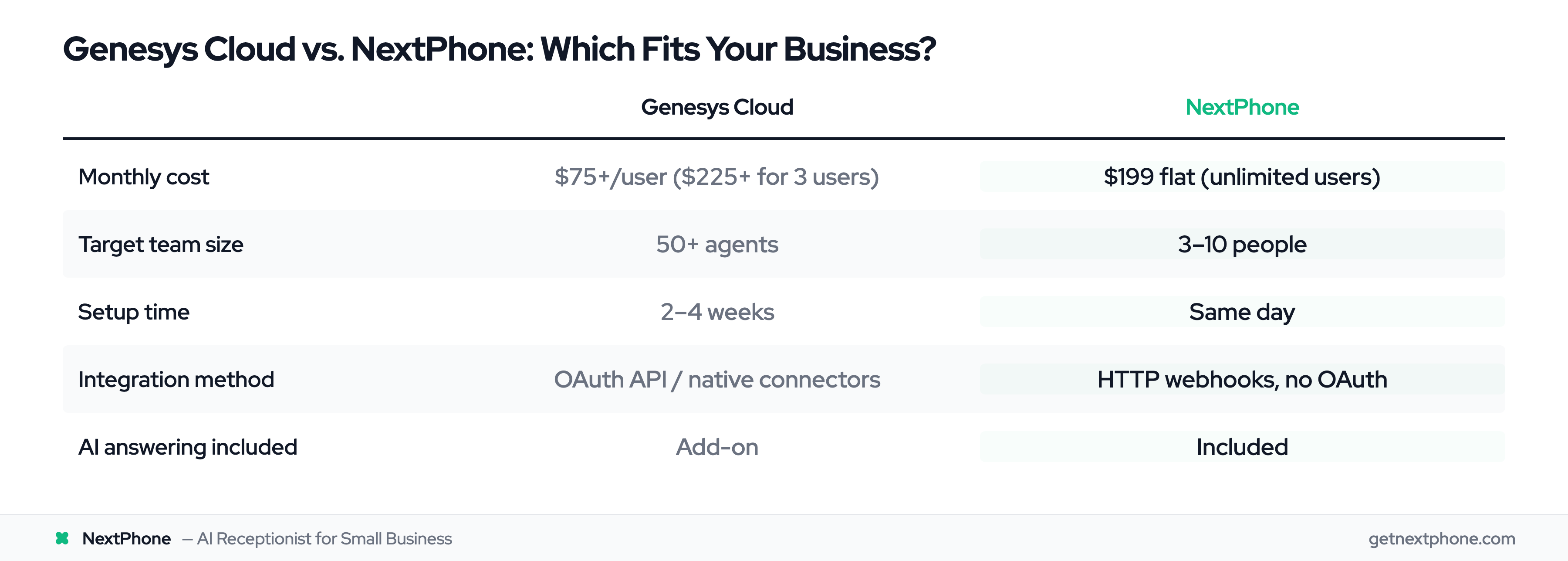
This is where NextPhone takes a different approach. Instead of building a massive enterprise platform and trying to scale it down for small businesses, NextPhone built specifically for SMBs while maintaining enterprise-grade integration capabilities.
HTTP Webhook Integration (Match Genesys Flexibility)
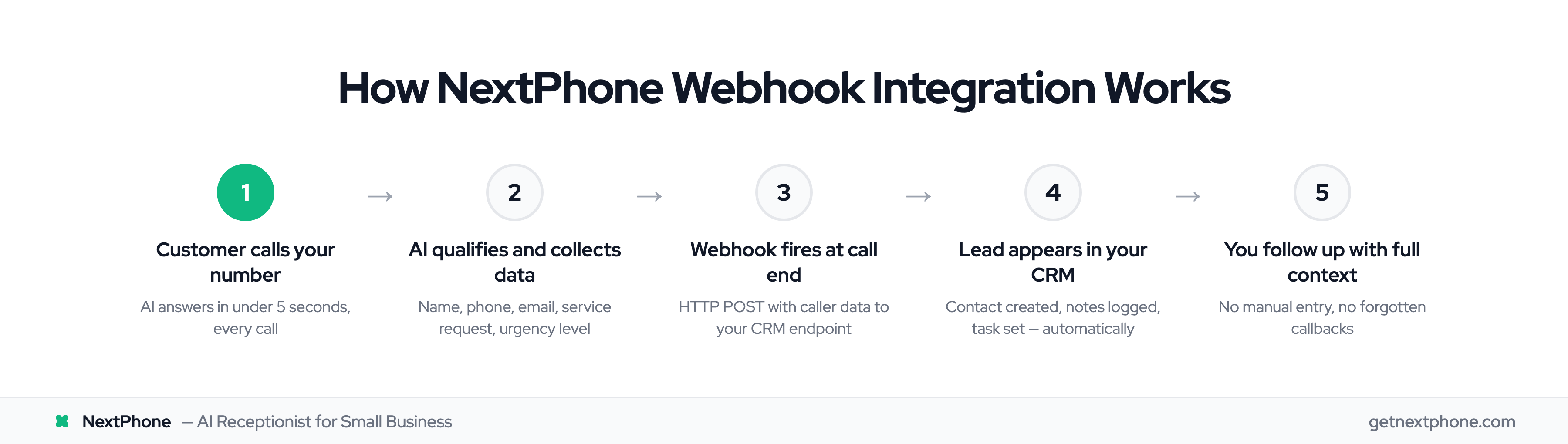
NextPhone's custom HTTP webhooks offer the same flexibility as Genesys Cloud's API integrations, but with dramatically simpler setup. You get fully customizable HTTP requests (GET, POST, PUT) that can integrate with any system that accepts webhooks.
Want to push leads to HubSpot? Configure a webhook with your HubSpot API endpoint and credentials. Using Salesforce? Same approach. Have a custom CRM built on Airtable or a proprietary system? No problem—if it has an API, NextPhone's webhooks can talk to it.
The setup uses template variables that map data automatically. Variables like [caller_number], [email], [company_name], and any custom fields you collect get inserted into your webhook payload automatically.
No OAuth flows to configure. No HMAC signature validation required. Just point the webhook at your endpoint, configure authentication headers if needed, and you're live in minutes.
Pre-Built Integrations (Email, SMS, Call Transfer)
Beyond custom webhooks, NextPhone includes integrations that work out of the box:
Email Notifications: Automatic email alerts after each call with caller details, AI-generated summaries, transcript links, and recording links. No configuration needed—it just works.
SMS Follow-Up: Twilio-powered SMS integration sends follow-up messages to callers automatically. Great for sharing booking links, appointment confirmations, or resources mentioned during calls.
Call Transfer: Live transfer to your phone mid-conversation when needed. The AI handles routine questions (hours, pricing, availability) and routes urgent matters or complex inquiries to you immediately.
Calendly Integration: Framework in place for checking availability and booking appointments during calls, with the AI collecting required information and guiding callers to scheduling.
Real Results from Small Businesses
The integration capabilities mean nothing without results. Here's what we found in our analysis of 130,175 calls from 45 home services contractors over 7 months.
Without automated integration, 74.1% of calls went completely unanswered. For a typical contractor receiving 42 calls per month, that's 31 missed calls—potential customers calling someone else because they reached voicemail.
With NextPhone's AI receptionist and automated CRM integration, businesses captured 3X more leads. Why? Because every call gets answered in under 5 seconds, caller information gets collected automatically, and lead data gets pushed to their CRM within seconds of the call ending.
The math is compelling. Take that typical contractor with 42 calls per month. If 74.1% would have gone unanswered (31 missed calls), and even just 20% would have converted at an average $3,500 project value, that's $21,700 per month in lost revenue—$260,400 per year.
NextPhone costs $199 per month flat rate, unlimited calls. The ROI is straightforward: $260,400 in captured revenue at a cost of $2,388 per year. That's 109X return on investment.
Compare that to Genesys Cloud at $225+ per month for a three-person team ($2,700+ per year), plus implementation costs, plus the weeks of setup time.
Setup Time Comparison
NextPhone setup takes hours, not weeks. The AI analyzes your website to extract business information, you configure which questions to ask callers, you set up webhook endpoints for your integrations, and you're live the same day.
Genesys Cloud implementation typically takes 2-4 weeks with consultant support for configuration, IVR design, integration setup, and user training.
For small businesses, time matters. You can't afford to wait a month to start capturing calls.
Getting Started with Phone System Integration
So how do you decide which path makes sense for your business?
Start with your team size and call volume. If you have 50+ agents handling thousands of calls daily, Genesys Cloud or similar enterprise CCaaS platforms (Five9, Talkdesk, NICE CXone) are worth evaluating. You'll use the advanced features, and the per-user pricing makes sense at scale.
If you're running a small team (3-10 people) handling 40-100 calls per month, you need different economics. Flat-rate pricing means predictable costs regardless of call volume spikes. Simple setup means you're capturing leads today, not next month.
The integration capabilities matter more than the platform size. Whether you're pushing leads to Salesforce through Genesys Cloud's native integration or through NextPhone's HTTP webhooks, the outcome is the same: automated lead capture without manual data entry.
Choose the tool that matches your scale and your budget, but don't compromise on the integration capabilities that actually drive results.
Frequently Asked Questions
What is Genesys Cloud used for?
Genesys Cloud is an enterprise contact center platform designed for organizations with 50+ agents handling omnichannel customer interactions. The platform manages voice, chat, email, and social media across channels with sophisticated routing, IVR capabilities, and workforce management. It's best suited for large teams with complex routing needs and dedicated IT resources for implementation and ongoing management.
How much does Genesys Cloud cost?
Genesys Cloud pricing starts at $75+ per user per month for the basic plan. A three-person team would pay $225+ monthly minimum, before adding costs for advanced features, premium integrations, or consultant support during implementation. The enterprise pricing model often requires "contact sales" conversations rather than transparent published pricing, which can make budgeting challenging for small businesses.
Can small businesses use Genesys Cloud?
Small businesses can technically use Genesys Cloud, but the pricing and complexity make it challenging. The platform is better suited for teams of 50+ with dedicated IT resources and enterprise integration needs. For SMBs typically handling 40-100 calls per month, the per-user pricing (minimum $225+ for three users) and weeks-long implementation timeline don't match the economics. Alternatives like NextPhone at $199/month flat rate with same-day setup deliver similar integration capabilities at SMB-appropriate scale and pricing.
What are the best Genesys Cloud alternatives for small businesses?
For small businesses seeking affordable contact center integration, several alternatives offer better value than Genesys Cloud's enterprise pricing. NextPhone leads for integration power at $199/month flat rate with enterprise-grade HTTP webhooks. Aircall starts around $30/user for basic needs with simpler setup. Freshdesk offers cost-effective plans for businesses prioritizing help desk features. The key is finding flat-rate pricing and simple setup rather than per-user enterprise models that don't scale down economically.
How do Genesys Cloud integrations work?
Genesys Cloud offers three integration types: native (pre-built connectors for Salesforce, ServiceNow, etc.), API (custom development using REST APIs with OAuth authentication), and webhooks (event-driven notifications pushed to external systems). API integrations require developer resources to implement OAuth flows and manage authentication. Webhooks need secure endpoint setup with HMAC signature validation. Native integrations are simplest but offer limited customization.
Can NextPhone integrate with my CRM?
Yes, NextPhone's HTTP webhooks integrate with any CRM that accepts API calls. This includes popular platforms like HubSpot, Salesforce, Pipedrive, Zoho CRM, and custom systems built on Airtable or proprietary databases. The setup uses template variables that automatically map caller data (name, phone, email, company, custom fields) into your CRM's required format. Unlike enterprise platforms requiring OAuth configuration, NextPhone's webhook setup takes minutes—just provide your API endpoint and authentication headers.
What's the difference between Genesys Cloud and NextPhone?
Genesys Cloud is an enterprise CCaaS platform built for organizations with 50+ agents, offering sophisticated omnichannel routing, workforce management, and complex IVR capabilities at $75+ per user/month with weeks-long implementation. NextPhone is an SMB-focused AI receptionist delivering similar integration capabilities (HTTP webhooks, CRM sync, automated workflows) at $199/month flat rate with same-day setup. Both offer powerful integrations—choose based on team size (3-10 people vs 50+), call volume (40-100 vs thousands monthly), and setup complexity tolerance.
Start Capturing Every Call
Contact center integration isn't just for enterprises anymore. Small businesses need the same capabilities—automated CRM sync, callback tracking, workflow automation—without the enterprise overhead.
Genesys Cloud delivers powerful integration for large organizations managing complex contact center operations. But if you're running a small team, you need those same capabilities at small business economics.
The businesses capturing the most leads in 2025 aren't necessarily the ones with the biggest platforms. They're the ones with systems that answer every call, capture every lead, and automate the follow-up—whether that's through enterprise CCaaS or purpose-built SMB solutions.