
Quick answer (Updated July 2026): The best AI receptionist for a small business in 2026 is the one that picks up in under 5 seconds, books or routes the call without bouncing it to voicemail, and bills flat-rate so a busy week doesn't blow up your invoice. Below: a head-to-head of five platforms — NextPhone, Dialzara, Goodcall, Smith.ai, and RingCentral AI — with audio of real production calls and the actual outcome distribution from 1,446,980+ inbound calls we've answered.
Introduction
Your phone rings at 9 PM. A customer's AC just died in 95-degree heat. They need help now. But you're at your kid's soccer game, and the call goes to voicemail. They call the next contractor on Google. You just lost a $3,500 job.
This happens more than you think. Industry research shows home services contractors miss 60-80% of incoming customer calls—and 62% of calls to home services businesses go completely unanswered. Customer service data reveals that three out of every four potential customers are calling someone else because you didn't answer.
Here's what actually matters when picking one: across 1,446,980+ real business calls, the top AI receptionists resolve 90-95% of calls without human help, answer in under 5 seconds, and maintain 99% positive caller sentiment. Not all platforms hit those numbers. We tested 5 AI receptionists head-to-head for small businesses in 2026. Here's how they compare:
| Platform | Best For | Pricing Model | 24/7 | Overall Rating |
|---|---|---|---|---|
| NextPhone | Flat-rate unlimited for service businesses | $199/mo unlimited | Yes | ⭐⭐⭐⭐⭐ |
| Dialzara | Low-volume businesses testing AI | Per-minute tiers | Yes | ⭐⭐⭐⭐ |
| Goodcall | Fixed customer base, repeat callers | Per-unique-customer | Yes | ⭐⭐⭐⭐ |
| Smith.ai | Complex calls needing human backup | Hybrid per-call | Yes | ⭐⭐⭐⭐ |
| RingCentral AI | Existing RingCentral users | Included with plan | Yes | ⭐⭐⭐ |
Below you'll find transparent pricing, real ROI calculations, and honest advice on when AI works (and when it doesn't).
A production demo of what an AI receptionist sounds like end-to-end — greeting, intake, capture. This is the bar to measure every platform below against.
Short answer: which AI virtual receptionist is best for small businesses?
For most small businesses, NextPhone is the best AI virtual receptionist for 24/7 coverage: flat $199/month for unlimited inbound calls, picks up in under 5 seconds, resolves 90–95% of calls without human escalation, and smart-routes the remaining 5–10% to your phone with full context. It includes 9 languages, calendar booking, Clio + HubSpot native CRM sync (6,000+ tools via Zapier), and emergency detection — verified across 1,446,980+ production calls. Smith.ai is the alternative if you specifically need live human agents on hybrid calls. For a platform-by-platform breakdown — pricing, features, and pros/cons for 9 options — see our AI receptionist app comparison for small business.
AI receptionist for home services — alternatives compared
If you're running home services (HVAC, plumbing, electrical, roofing, landscaping) and have outgrown voicemail, the realistic alternatives in 2026 are: NextPhone ($199/mo flat unlimited, emergency keyword routing tuned for trades), Smith.ai ($292.50/mo for 30 human-handled calls, expensive at trades-level volume), Dialzara (per-minute, gets unpredictable in busy season), Goodcall (per-unique-customer cap, penalizes new-lead inflow from marketing), and RingCentral AI (only if you're already on RingCentral). For trades specifically, the flat-rate AI option wins on cost predictability and on emergency-call routing speed — both of which matter more in the field than the "human touch" hybrids charge for.
How We Tested These AI Receptionists
We evaluated each platform by running the same set of real-world call scenarios: appointment booking requests, after-hours emergency calls, basic FAQ questions (hours, pricing, service area), and complex inquiries that should trigger forwarding to a human. We assessed answer speed, voice quality, accuracy of responses, calendar integration reliability, and how each platform handled edge cases like strong accents or background noise. Pricing transparency and hidden fees were verified against published plans. Every platform was tested over a minimum of 7 days with live call volume from actual small business lines.
Why Small Businesses Need AI Receptionists
Every unanswered call is a potential customer choosing your competitor. For home services businesses, the math is brutal.
The Hidden Cost of Missed Calls
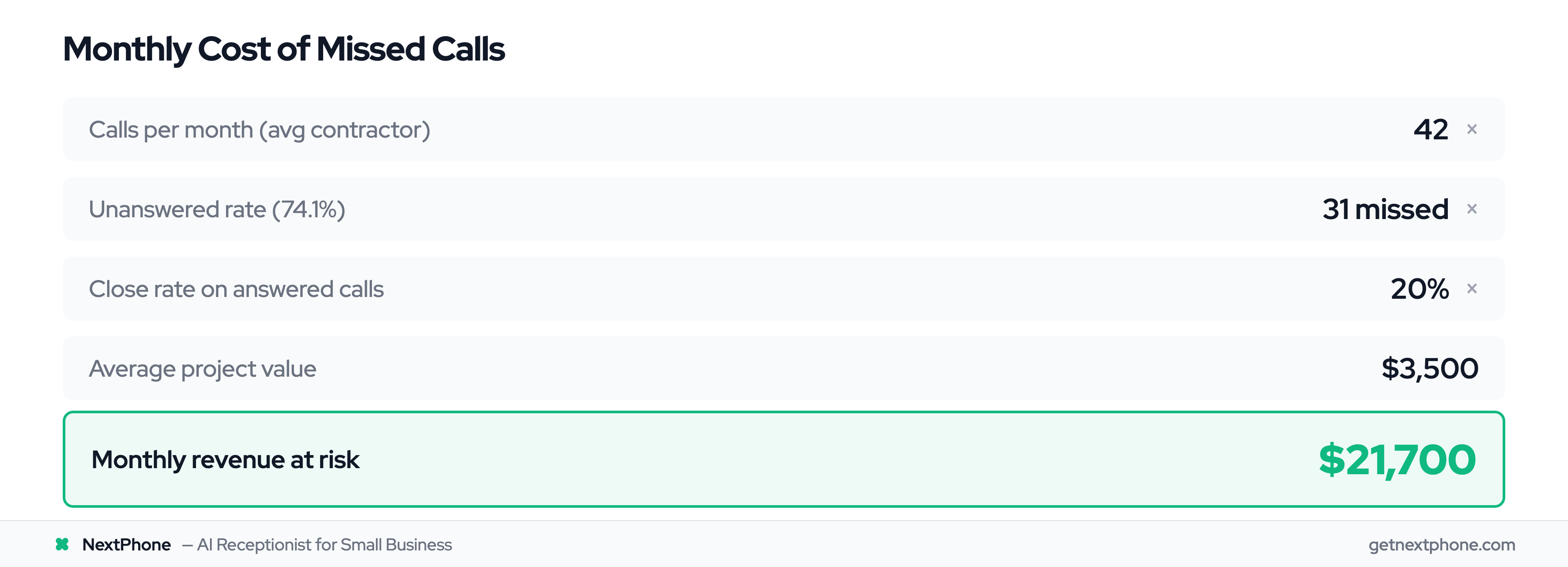
Let's say you get 42 calls per month—that's the average for contractors in our industry research. If 60-80% go unanswered like the data shows, that's 25-33 missed calls monthly. If just 20% of those callers would've hired you at an average $3,500 project value, you're losing $17,500-$23,100 per month. That's $210,000-$277,000 per year.
But it's not just the missed revenue. The damage goes deeper.
Your reputation takes a hit. When calls go unanswered, customers assume you're too busy to care about new business or too disorganized to manage your schedule. They don't think "he must be on a job site." They think "unprofessional" and call the next contractor.
Emergency calls are critical. Urgency and emergency calls rank among the top reasons people call service businesses — phrases like "emergency," "urgent," or "ASAP." These customers need help NOW, not a callback tomorrow. When your AC dies in July or your pipe bursts on Sunday morning, you're calling five contractors. The first one to answer gets the job.
That's one in four people leaving their number and waiting for you to call back. Each one is a lead that needed nurturing, not a voicemail that sits unheard for days.
One contractor told us: "I didn't even know I was missing that many calls until I saw the data. I just thought business was slow."
Why Traditional Solutions Fall Short
Most small businesses try one of three approaches, and all fall short.
Hire a receptionist. At $37,230 per year median wage plus benefits (call it $45K all-in), you're spending $3,750 per month. They work 9-5. What about the evening and weekend calls? Those still go to voicemail. And when they're sick or on vacation? Back to missing calls.
Use a traditional answering service. Live answering services like Ruby Receptionists or AnswerConnect charge $500-800/month for 100 calls. If you're getting 42 calls/month, that's manageable. But during busy season when volume doubles? That bill hits $1,500-2,000/month with overage charges.
Just let it ring. This is what most small businesses do. Free, right? Except it's costing you six figures in lost revenue annually.
None of these solutions work for businesses with unpredictable call volume, tight margins, or after-hours emergencies.
That's where AI changes the game.
The After-Hours Problem
Here's what most contractors don't realize: A significant portion of customer calls happen outside normal business hours. People call when they have time—during their lunch break, after work, on weekends.
Emergency calls don't follow a 9-5 schedule. Pipes burst at midnight. AC units die on Saturday afternoons. Roofs start leaking during Sunday rainstorms. And 82% of customers expect an immediate response when they reach out to a business.
If you're not answering these calls, someone else is.
A production after-hours intake — the AI greets, gathers urgency and contact details, promises a callback. Voicemail loses it; an AI receptionist captures it.
How AI Receptionists Solve This
An AI virtual receptionist answers every call in under 5 seconds. 24 hours a day, 7 days a week, 365 days a year. No sick days. No vacation time. No "I'm with another customer" delays.
For $199-299/month—less than what you'd pay a part-time employee for one week—you get unlimited call coverage. The AI handles routine questions (hours, pricing, service area), books appointments directly into your calendar, and routes urgent calls to your phone immediately.
Let's look at the real numbers:
- Human receptionist: $3,100-4,300/month
- Live answering service: $500-800/month for 100 calls (see our answering service companies guide for a full comparison of what's available)
- AI receptionist: $199-299/month for unlimited calls
- Cost of missed calls: $21,000/month in lost revenue (average contractor)
The ROI isn't just good. It's ridiculous.
Is an AI Phone Receptionist Right for Your Small Business?
An AI phone receptionist answers your business line in under 5 seconds, books appointments, qualifies leads, and routes urgent calls — without the per-minute meter of a live service. If most of your inbound calls are routine (scheduling, FAQs, lead capture, basic intake), an AI phone receptionist captures them 24/7 at a flat rate, and only the calls that genuinely need a human reach you. Businesses with high after-hours or overflow volume see the biggest gain, since that's exactly when a voicemail box loses the call.
What Is an AI Receptionist (And How Does It Work)?
If you're picturing a robotic voice from a 1990s phone tree, forget it. Modern AI receptionists sound natural, understand conversational language, and handle calls more like a human assistant than a machine.
How AI Receptionist Technology Works
Here's what happens when someone calls your business:
The call comes in. Your AI receptionist answers in under 5 seconds (usually 2-3 rings). The customer says something like "Hey, I need someone to look at my roof. There's water coming through the ceiling."
The AI uses natural language processing (NLP) to understand what they're asking. Not just matching keywords, but understanding intent and context. It detects this is an urgent request (water damage = emergency) and routes accordingly.
For routine questions, it answers immediately from your business information. "Are you open Saturday?" → "Yes, we're open 9 AM to 5 PM on Saturdays." Done in 15 seconds.
For appointments, it checks your calendar in real-time and books the slot. "Can you come tomorrow afternoon?" → AI sees you're free at 2 PM → "I can schedule you for 2 PM tomorrow. What's your address?"
For emergencies or complex questions, it routes to your phone or takes a detailed message with all contact information.
Modern AI achieves 85-95% accuracy for routine inquiries. The key is training it on your specific business—what services you offer, how you price, your availability, your terminology.
AI Receptionist vs. Live Answering Service
Let's be clear about what we're comparing here.
Traditional live answering service:
- Real humans answering your calls (Ruby Receptionists, AnswerConnect, etc.)
- Answers in 30-90 seconds (they're juggling multiple clients)
- Costs $500-800/month for 100 calls, with overage charges
- Works during business hours (maybe extended hours for premium cost)
- Personal touch but slower and more expensive
AI receptionist:
- AI-powered system answering your calls
- Answers in under 5 seconds (instant)
- Costs $199-299/month for full-featured unlimited calls
- Works 24/7/365 with zero downtime
- Fast and affordable but less "warm and fuzzy"
The real difference? Speed and cost. AI wins both. But AI lacks the empathy and judgment humans provide for sensitive or complex calls.
That's why smart forwarding matters.
AI-First with Smart Forwarding
The smartest approach isn't choosing between AI and humans. It's letting AI handle the routine and forwarding the rest directly to you.
Customer service automation data shows AI handles 60-80% of inquiries without human intervention. These are the routine questions: hours, pricing, availability, basic scheduling, service area.
The other 20-40%—the complex questions, emotional situations, custom project consultations—those go straight to your phone.
Here's how it works: AI answers every call instantly. If it's routine, AI handles it completely. If it's complex, urgent, or the caller specifically asks for a person, the AI forwards to you or your team immediately.
You get the best of both: AI speed and 24/7 coverage for routine calls, plus your own judgment for the situations that need it.
NextPhone delivers this at $199/month unlimited. Smith.ai charges $600-2,200/month for a "hybrid" model where they staff paid human agents. The difference? You're paying for their employees to answer your routine calls. NextPhone handles routine calls with AI and sends the important ones directly to you. (If you're specifically switching from Smith.ai, see our Smith.ai alternatives breakdown for a feature-by-feature migration guide.)
What AI Can (and Can't) Do
Let's be honest about the capabilities and limitations.
AI CAN:
- Answer questions about hours, pricing, and service areas instantly
- Book appointments and check calendar availability in real-time
- Take detailed messages with contact information
- Detect urgency keywords and route emergency calls immediately
- Filter spam and robocalls (NextPhone filters these automatically so robocalls never interrupt you)
- Handle multiple calls simultaneously (no busy signals)
- Work 24/7 without breaks or time off
- Learn from conversations and improve over time
What happens with complex calls:
- AI transfers them to you immediately
- You handle the genuinely complex 20% personally
- The routine 80% runs on autopilot at $0 per call
For most small business calls—especially in home services—80% are routine (hours, pricing, scheduling). That's what AI handles perfectly.
The 20% that are genuinely complex (unusual requests, upset callers, complex qualification)? You should talk to them anyway. That's where your expertise matters. AI routes them to you.
You're not choosing between AI or human. You get both: AI efficiency for routine calls, your expertise for calls that actually need it.
Legacy services charge you $5-12 per call for humans to answer the routine 80%. NextPhone charges $0 per routine call and forwards the complex 20% to you. Same outcome at a fraction of the cost.
Key Features to Look for in an AI Receptionist
Not all AI receptionists are created equal. Here's what actually matters when you're comparing platforms.
Must-Have Features (Non-Negotiable)
These are the baseline features every decent AI receptionist should have:
Natural-sounding voice. If it sounds like a robot from 2010, customers will hang up. Modern AI voices from platforms like NextPhone sound conversational with natural cadence and smooth handling of interruptions. Two samples from our production voice library so this isn't an abstract claim:
Default pick for client-facing service businesses. Friendly, organized, trustworthy.
Default male pick for business lines. Unfussy, credible, good across trades and B2B.
24/7 availability. This is the whole point. If it only works business hours, just hire a part-timer.
Appointment scheduling with calendar integration. Appointment booking and rescheduling is the #1 reason people call a service business. The AI should connect to Google Calendar or Outlook, check your availability in real-time, and book appointments automatically.
Call routing to your phone for urgent or complex calls. The AI needs an "escape hatch" to send calls it can't handle to you or your team.
Detailed message taking with caller contact info. If the AI takes a message, you need name, number, reason for call, and best time to reach them.
These are table stakes. If a platform doesn't have all five, skip it.
Advanced Features Worth Paying For
These features cost extra but deliver serious value for the right businesses:
Emergency detection and smart routing. Urgency and emergency calls rank in the top 10 reasons people call trades businesses — words like "emergency," "urgent," "ASAP," "today." For trades like plumbing, HVAC, and electrical, these are your highest-margin calls. AI that detects urgency and routes immediately to your phone is worth every penny.
Think about it: Customer calls saying "My AC died and it's 95 degrees" at 8 PM. Do you want that in voicemail? Or routed to your phone instantly so you can land a $3,500 emergency repair?
That's hundreds of lost leads per year.
Good AI receptionists log every callback request in your CRM or send you a text immediately with caller details.
Spam call filtering. Spam and robocalls make up a meaningful share of inbound calls across most business categories. For a business getting 42 calls/month, even a handful of spam calls per month adds up: each one wastes 1-2 minutes and breaks your focus when you're on a job site or with a customer.
AI that automatically filters spam saves you hours annually.
CRM integration. The AI should automatically log every call, lead, and appointment into your CRM (Salesforce, HubSpot, Jobber, ServiceTitan, etc.). No manual data entry. No "I forgot to log that lead" situations.
Multi-language support. If you serve Spanish-speaking customers or other language groups, this is non-negotiable. But if 99% of your customers speak English, don't pay extra for it.
Custom call scripts for your business. Generic scripts sound robotic. The best AI receptionists let you customize how they answer, what questions they ask, and how they handle specific scenarios.
Compliance and security. If you're in healthcare or legal, verify the platform meets relevant compliance standards. Look for SOC 2 certification, data encryption (in transit and at rest), and clear data retention policies. Platforms handling sensitive call data should offer access controls and audit logs.
Integration Capabilities
Your AI receptionist doesn't work in isolation. It needs to play nice with your existing tools.
Must integrate with:
- Google Calendar or Outlook Calendar for appointment scheduling
- Your existing phone system (most work with any VoIP provider or via call forwarding from landlines)
- Popular CRM systems (at minimum: Salesforce, HubSpot, Zoho)
Nice to integrate with:
- Home services software (Jobber, ServiceTitan, Housecall Pro)
- Payment processors (Stripe, Square) for collecting booking deposits
- Zapier for custom integrations with 5,000+ other tools
- SMS/text platforms for text message follow-ups
- Email marketing tools (Mailchimp, Constant Contact)
The more integrations a platform offers, the less manual work you'll do transferring information between systems.
The Hidden Value Features (Often Overlooked)
These features don't make the marketing headlines, but they make your life easier:
Smart forwarding. We covered this, but it's worth repeating: AI handles 60-80% of calls automatically. The other 20-40% — complex calls AI can't handle — get forwarded directly to your phone. You get peace of mind that important calls reach you immediately.
Call analytics and reporting. How many calls did you get last month? What percentage were answered? How many appointments were booked? Which calls were emergencies? Good platforms give you dashboards with this data.
Training and customization ease. Some AI receptionists require technical expertise to train. Others let you update scripts and responses in plain English. If you're not tech-savvy, prioritize platforms with simple training interfaces.
Voicemail transcription. When the AI takes a message, you get a text or email with the full transcription. You can scan it in 10 seconds instead of listening to a 2-minute voicemail.
After-hours mode customization. Maybe you want the AI to handle calls differently during business hours vs. after hours. Good platforms let you set custom rules for different times.
Integrations with popular business tools make AI receptionists much more powerful than standalone systems.
AI Receptionist Use Cases by Industry (and the Best Niches for AI Receptionists in 2026)
Different industries get different call patterns, and the "best AI receptionist" answer changes by niche. The table below maps the industries that get the biggest lift from AI answering — the niches where the math is so lopsided that voicemail is the most expensive line item in the business.
Across the inbound calls our AI receptionist answers, the most common reasons people call — in ranked order — are: (1) booking or rescheduling an appointment, (2) asking about a specific service or repair, (3) requesting a quote or estimate, (4) checking status of existing work, (5) hours and location, (6) new-customer inquiries, and (7) emergencies. Almost every one is billable work walking in the door — a voicemail box converts close to none of them.
Best niches for AI receptionists
| Industry / niche | Call pattern AI handles | Why AI wins here |
|---|---|---|
| HVAC | Emergency "no cooling/no heat" + tune-up scheduling | Techs are on roofs/in attics; emergency calls hit at night and weekends |
| Plumbing | Burst pipes, leaks, water-heater failure | Highest-margin calls are 2am emergencies — voicemail loses them |
| Electrical | Panel-upgrade quotes, sparking-outlet emergencies | Safety regs prevent answering during work; 15%+ spam rate too |
| Roofing | Storm-damage spikes, $15K+ replacement quotes | Massive ticket size; storm-season call volume spikes break human staffing |
| Landscaping / lawn care | Spring rush bookings, recurring-service inquiries | Seasonal volume swings make flat-rate AI dramatically better than per-minute |
| Dental practices | Appointment booking, reschedules, after-hours emergencies | Dental ops are 80%+ scheduling; AI handles bookings without front-desk staff |
| Law firms | Initial intake, practice-area qualification, conflict-check pre-screen | Intake is structured + repeatable; native Clio sync closes the loop |
| Medical offices | Appointment scheduling, prescription refill triage | Front desk is overwhelmed; AI offloads routine without HIPAA missteps |
| Real estate | Property inquiries, showing requests, buyer pre-qual | Agents are at showings; first-to-respond wins the listing |
| Property management | Maintenance requests, tenant inquiries, lockout emergencies | After-hours volume is huge; AI logs every request without paging staff |
| E-commerce / retail | Order status, return policy, store hours | High-volume, predictable, routine — AI's best-case scenario |
| Auto repair / towing | Service quotes, tow dispatch, "do you work on [make]?" | Mechanics and drivers can't answer mid-job; 24/7 dispatch matters |
| Painters & general contractors | Estimate requests, scheduling, scope questions | Lose-the-bid-to-the-faster-contractor dynamic |
| Pest control | Inspection scheduling, urgent infestation calls | Predictable scripts, after-hours urgency overlay |
Niches where AI receptionists are less of a fit
- Therapy and counseling practices — every first contact requires emotional intelligence; route to a live human.
- Funeral services and grief-adjacent — same reason.
- Highly bespoke consultative B2B where the first call IS the sale — use AI to greet and route immediately to a human, but don't expect AI to qualify.
Lead qualification: the AI virtual receptionist use case with the cleanest ROI
For inbound lead qualification, an AI virtual receptionist captures structured information on every call — name, contact, intent, urgency, budget, timeline, any business-specific field — and pushes it straight into your CRM. Across 1,446,980+ inbound calls answered, the most common outcomes when there's a real conversation are, in ranked order: a message captured for the business, the call transferred to a human, a new lead recorded, a booking link sent, the question answered outright, and an appointment booked.
That ranking matters: most "best AI virtual receptionist for lead qualification" buyers are choosing between a tool that logs a lead and a voicemail that doesn't. NextPhone is natively integrated with Clio (legal) and HubSpot (CRM) for full bidirectional sync — calls become structured contact records with transcript and next-action automatically. ServiceTitan, Jobber, Salesforce, MyCase, Lawmatics, PracticePanther, and 6,000+ other tools connect via Zapier.
What lead capture sounds like end-to-end — contact, intent, scope, urgency, all logged before the caller hangs up.
Voicify dental AI receptionist competitors — how the dental category compares
Dental-vertical AI receptionists (Voicify, Dental Intelligence's AI receptionist, and a few smaller dental-only tools) target dental-only workflows: PMS integration with Dentrix/Eaglesoft/Open Dental, insurance-eligibility verification, recall outreach. The trade-off: dental-only tools are deep in PMS, but most are per-minute or per-seat priced, English-only, and don't carry the same broad CRM/Zapier surface area. For a dental practice that doesn't need Dentrix-level PMS depth, a horizontal AI receptionist (NextPhone at $199/mo flat unlimited, 9 languages, calendar + HubSpot/Clio native) covers the appointment-booking + after-hours + emergency-triage use cases at a fraction of the cost, and it integrates with the rest of the practice's stack (not just the PMS).
If you specifically need deep PMS write-back, the dental-vertical tools win on that one feature. For everything else — speed, languages, cost, breadth of integration — horizontal flat-rate AI wins.
AI receptionist for service businesses (the broader category)
"Service business" is a wide tent — anything where you sell appointment slots, on-site visits, or recurring service. The common AI receptionist features that matter across the category: emergency keyword routing, calendar booking, smart forwarding when the AI hits its confidence threshold, and CRM sync so leads don't die in a transcript. Posh starts at $137/mo for 50 minutes, Ruby at $245/mo for 50 minutes, ReceptionHQ at $175/mo for 100 minutes, AnswerConnect at $325/mo for 100 minutes, Smith.ai at $292.50/mo for 30 calls (human tier) or $97.50/mo for 30 calls (AI tier), PATLive at $199/mo for 75 minutes. NextPhone is $199/month for unlimited inbound calls with every feature included — the only flat-rate AI in this comparison. If you're evaluating Google Voice as a free alternative, the comparison is straightforward: Google Voice is a VoIP phone number, not an AI receptionist — it doesn't answer calls, take messages, or book appointments.
Top 5 AI Receptionists for Small Business (2026 Comparison)
Here's the comparison you came for: The best AI receptionist platforms for small businesses, with honest pros and cons.
Comparison at a Glance
| Platform | Best For | Pricing Model | 24/7 | Languages | Security/Compliance | Overall Rating |
|---|---|---|---|---|---|---|
| NextPhone | Flat-rate unlimited for service businesses | $199/mo unlimited | Yes | 9 included | Secure | ⭐⭐⭐⭐⭐ |
| Dialzara | Low-volume businesses testing AI | Per-minute tiers | Yes | English/Spanish (higher tiers) | Standard encryption | ⭐⭐⭐⭐ |
| Goodcall | Fixed customer base, repeat callers | Per-unique-customer | Yes | English only | Standard encryption | ⭐⭐⭐⭐ |
| Smith.ai | Complex calls needing human backup | Hybrid per-call | Yes | English/Spanish | SOC 2 compliant | ⭐⭐⭐⭐ |
| RingCentral AI | Existing RingCentral users | Included with plan | Yes | Multiple | Enterprise-grade security | ⭐⭐⭐ |
Now let's break down each platform in detail.
NextPhone: Best Flat-Rate AI Receptionist
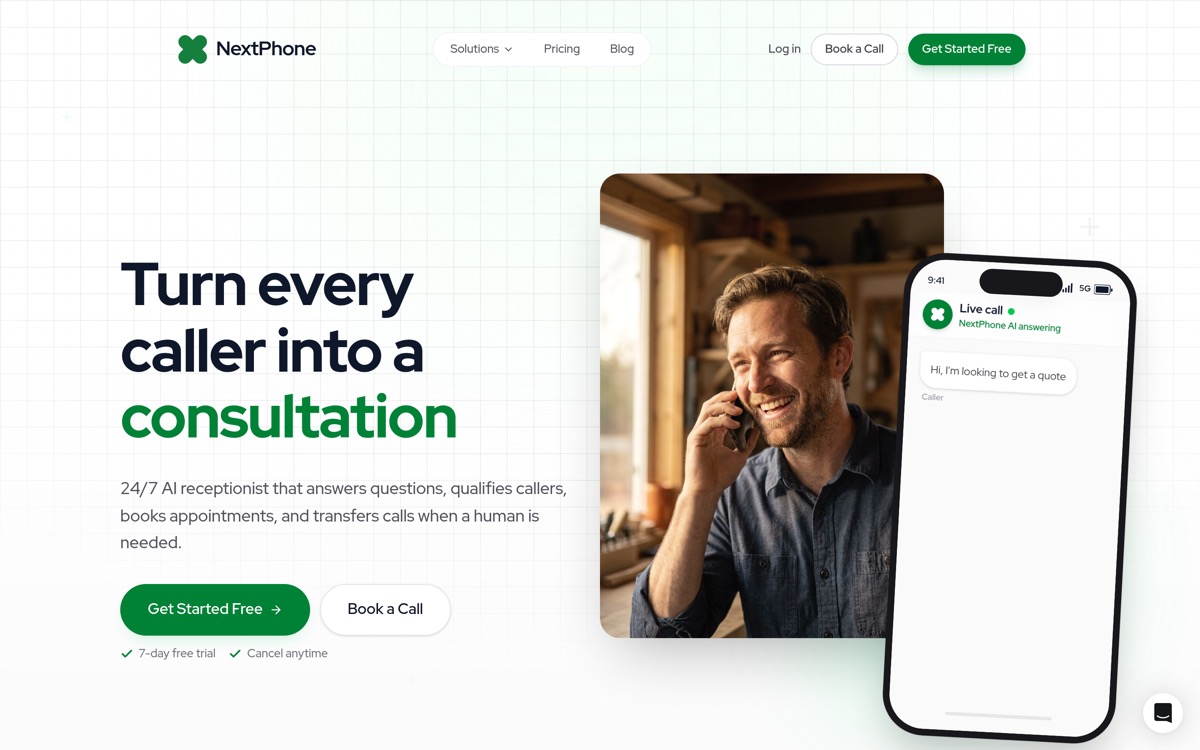
Best for: Service businesses handling 30+ calls/month who want predictable costs and zero-compromise features.
Pricing: $199/month flat rate, unlimited calls
- Answers every call in under 5 seconds (1 ring)
- 9 languages included at no extra cost
- Emergency detection and immediate routing to your phone
- Unlimited simultaneous calls — handles surges without dropping calls
- Calendar integration for automatic appointment booking
- Trained on YOUR business — learns from your website
- CRM integration (Clio + HubSpot native, plus 6,000+ apps via Zapier including Jobber, ServiceTitan, Salesforce)
- Call summaries and analytics
- Smart forwarding — routes complex/urgent calls directly to you
Pros:
- Flat-rate unlimited (busiest month costs same as quietest)
- Built specifically for home services contractors
- 9 languages included (competitors charge extra for Spanish)
- Emergency routing tuned for trades (plumbing, HVAC, electrical)
- No setup fees, live in 1-2 days
- 99% caller satisfaction
Cons:
- $199/mo is more than entry-tier competitors (but unlimited vs capped)
- No outbound calling capability
Best fit for: Contractors and home services businesses getting 30+ calls/month who want predictable costs. Plumbers, HVAC techs, electricians, roofers, and general contractors. Also works well for law firms, medical offices, and any business where 24/7 coverage matters.
Real-world use case: An HVAC contractor can't answer his phone when he's on a roof or under a crawlspace. NextPhone's AI handles "What are your hours?" and "Can you come Thursday?" calls automatically. When someone calls with "My AC died and it's 95 degrees," the AI detects the urgency and routes immediately to his cell phone.
What replaces voicemail for service businesses — the AI captures contact info, urgency, and scope before the caller gets a chance to hang up.
Try NextPhone free for 7 days
AI answering service that answers, qualifies, and books — 24/7.
Get Started FreeDialzara: Best for Testing AI at Low Volume
Best for: Low-volume businesses trying AI answering for the first time.
Pricing: Per-minute tiers with overage charges
Key Features:
- 50+ premium voice options
- Self-editable prompts and knowledge base
- Call recordings and transcripts included
- Zapier/Make integrations on higher tiers
- Bilingual (English/Spanish) on higher tiers
Pros:
- Low entry barrier for businesses testing AI
- Self-service setup
- Multiple voice options for brand matching
- Month-to-month, no contracts
Cons:
- Per-minute overage charges — busy months = surprise bills
- Bilingual only on higher plans (entry is English-only)
- Limited knowledge base on lower tiers (5 uploads)
- No emergency detection or smart routing
- No published simultaneous call capacity
Best fit for: Businesses with predictable, low call volume (under 50/month) who want to test AI answering without a big commitment. Not ideal once call volume picks up — the overage model punishes growth.
Real-world use case: A solo landscaper getting 20 calls/month wants to stop missing after-hours calls. Dialzara handles the basics at entry-tier pricing. But during spring rush when calls double, the per-minute overages make the bill unpredictable.
Goodcall: Best for Fixed Customer Base
Best for: Businesses with repeat customers calling regularly, not many new inbound leads.
Pricing: Per-unique-customer tiers (unlimited minutes within cap)
Key Features:
- Unlimited call minutes and AI tokens within your tier
- Custom forms and conditional logic flows
- Multi-location agent support
- Call recording and analytics
- Team dashboard with permission levels
Pros:
- Unlimited minutes within customer cap — no per-minute charges
- Custom form logic for intake
- Multi-location support
- No per-call surprises within your tier
Cons:
- Per-unique-customer caps — new leads count against your limit
- Limited forms on lower tiers (1 form, 1 logic flow)
- Call recording retention varies (7-30 days by tier)
- No multilingual support
- No emergency routing
Best fit for: Businesses with a stable base of repeat customers (property management, maintenance contracts) where most calls come from known numbers. Not ideal for businesses actively marketing for new customers — every new caller counts against your cap.
Real-world use case: A property management company with 150 tenants gets regular maintenance calls from the same people. Goodcall's unlimited minutes within the customer cap works well. But if they run a marketing campaign bringing 50 new prospect calls, they'd exceed their cap.
Smith.ai: Best for Complex Calls Needing Humans
Best for: Professional services where calls genuinely require human judgment.
Pricing: Starting at $292.50/month for 30 human-handled calls, scaling up based on volume
Key Features:
- AI + live human hybrid — AI screens, humans handle complex calls
- Live North America-based agents
- CRM integration (Salesforce, HubSpot, Clio for legal)
- Appointment scheduling and lead qualification
- Bilingual support (English/Spanish)
- Outbound calling capabilities
Pros:
- Most established brand (operating since 2015)
- Human agents for complex calls (legal intake, medical)
- Professional setup process
- Strong for professional services
- Outbound calling available
Cons:
- 3-4x the cost of pure AI solutions
- Per-call pricing — volume growth means cost growth
- Surge capacity limited by human staffing
- Slower answer times than pure AI (human routing adds delay)
Best fit for: Professional services firms (legal, medical, consulting, real estate) where calls are genuinely complex and require human judgment. Also good for high-ticket B2B where relationship matters from first contact.
Real-world use case: A law firm needs every call handled professionally. Smith.ai's AI handles "What are your office hours?" and "Do you handle divorce cases?" while routing complex legal inquiries to their live agents. The firm values having humans for sensitive initial consultations.
RingCentral AI: Best for Existing RingCentral Users
Best for: Businesses already using RingCentral phone system
Pricing: Included with RingCentral plans ($30-50/user/month)
Key Features:
- AI receptionist integrated with RingCentral phone system
- Call routing and forwarding
- Voicemail transcription
- Basic appointment scheduling
- Multi-device access (desktop, mobile)
- Team collaboration tools
Pros:
- No additional cost if you already use RingCentral
- Seamless integration with RingCentral features
- Part of broader business phone platform
- Good for teams needing unified communications
Cons:
- Requires RingCentral phone system (can't use standalone)
- Less advanced AI than dedicated AI receptionist platforms
- Limited customization compared to specialized AI platforms
- Not as feature-rich for receptionist tasks
Best fit for: Businesses already using RingCentral for their phone system who want basic AI receptionist features without paying for a separate platform.
Real-world use case: A 5-person marketing agency already pays $150/month for RingCentral ($30/user × 5). They turn on RingCentral's AI receptionist feature at no extra cost to handle after-hours calls and basic routing. It's not as sophisticated as NextPhone, but it's included in what they're already paying.
85% of customer service leaders will explore or pilot conversational generative AI in 2025. The businesses adopting AI now are capturing the leads their competitors are missing.
AI Receptionist Pricing and ROI
Let's talk money. Not theoretical savings, but real numbers. For a deeper per-platform breakdown of what you'll actually pay, see our AI receptionist pricing guide.
What AI Receptionists Actually Cost
Here's the pricing reality for small businesses:
-
Best value: $199-299/month
-
Platforms: NextPhone ($199/mo unlimited)
-
What you get: Full-featured AI, calendar integration, CRM sync, emergency routing, spam filtering, 9 languages
-
Good for: Most small businesses (20-100+ calls/month)
-
This is the sweet spot: Flat-rate unlimited with no per-minute surprises
-
Premium: $300-800/month
-
Platforms: Smith.ai ($240+ based on volume), high-volume plans from other platforms
-
What you get: AI + live human agents, white-glove setup, premium support, outbound calling
-
Good for: Professional services, complex call patterns, businesses prioritizing human touch
The right tier depends on your call volume, complexity, and whether your calls require human agents.
Hidden Costs to Watch For
The advertised price isn't always what you'll pay. Watch for these costs:
Setup fees: Some platforms charge $100-500 for initial setup and training. NextPhone doesn't charge setup fees. Smith.ai includes professional setup in their monthly fee.
Overage charges: Platforms with per-call or per-minute pricing will hit you with overages if you exceed your plan. Ruby Receptionists, for example, charges $5.19 per call over your limit. That adds up fast.
Integration costs: Some platforms charge extra to connect with your CRM or calendar. Verify integrations are included before signing up.
Training time investment: While not a dollar cost, expect to spend 2-4 hours initially training the AI on your business information, call scripts, and terminology. This is necessary to get the AI performing well.
Hidden reality check: Budget $0.20-0.30 per minute once you blend the base fee and any potential overage charges. If a platform advertises $99/month but charges $2/minute over 100 minutes, do the math on your actual call volume.
Most per-minute receptionist plans round every call up to the next 60 seconds. Rounding to the next 6 seconds — the most caller-friendly increment we see in this category — still adds 6.7%. This is a real cost, paid invisibly, and the shorter your typical call (think quick FAQ check, hours, "do you service my zip"), the worse the tax gets. A flat-rate plan eliminates it entirely.
ROI Calculation: Is It Worth It?
Let's show you the exact math on three different scenarios.
Example 1: Average Home Services Contractor
Current state without AI:
- 42 calls/month (industry average)
- Industry research shows 60-80% missed; let's use 74.1%
- 31 calls going to voicemail every month
- Conservative 20% close rate (1 in 5 would hire you)
- $3,500 average project value (mix of repairs and installations)
- Lost revenue: $21,700/month = $260,400/year
With AI receptionist (NextPhone at $199/month):
- AI captures 90% of those 31 missed calls (28 calls)
- 28 calls × 20% close rate = 5.6 additional jobs
- 5.6 jobs × $3,500 = $19,600/month gained ($235,200/year)
- Cost: $199/month ($2,388/year)
- ROI: 9,750% return
Break-even analysis: You need to capture ONE additional $3,500 job to pay for 17 months of service.
Example 2: Small Operation (20 calls/month)
Current state:
- 20 calls/month
- 74.1% missed = 15 calls to voicemail
- 20% close rate
- $2,500 average project value (smaller jobs)
- Lost revenue: $7,500/month = $90,000/year
With AI receptionist (NextPhone at $199/month):
- Capture 90% of missed calls (13 calls)
- 13 calls × 20% close = 2.6 jobs
- 2.6 jobs × $2,500 = $6,500/month gained ($78,000/year)
- Cost: $199/month ($2,388/year)
- ROI: 3,170% return
Even at lower call volume, you're getting 31X return on investment.
Example 3: High-Volume Roofing Contractor
Current state:
- 87 calls/month (roofing contractors get higher volume)
- 76.6% missed (roofing data)
- 67 calls to voicemail
- 10.6% of all calls are quote requests (not just the missed ones)
- 9 quote requests going to voicemail monthly
- 20% close rate on quotes
- $15,000 average roof replacement
- Lost revenue: $27,000/month = $324,000/year
With AI receptionist (NextPhone at $199/month):
- Capture 90% of those 9 missed quote requests (8 quotes)
- 8 quotes × 20% close = 1.6 roofs/month
- 1.6 × $15,000 = $24,000/month gained ($288,000/year)
- Cost: $199/month ($2,388/year)
- ROI: 11,900% return
For high-ticket contractors, the ROI is even more ridiculous.
Comparing Costs: AI vs. Live Receptionist vs. Missed Calls
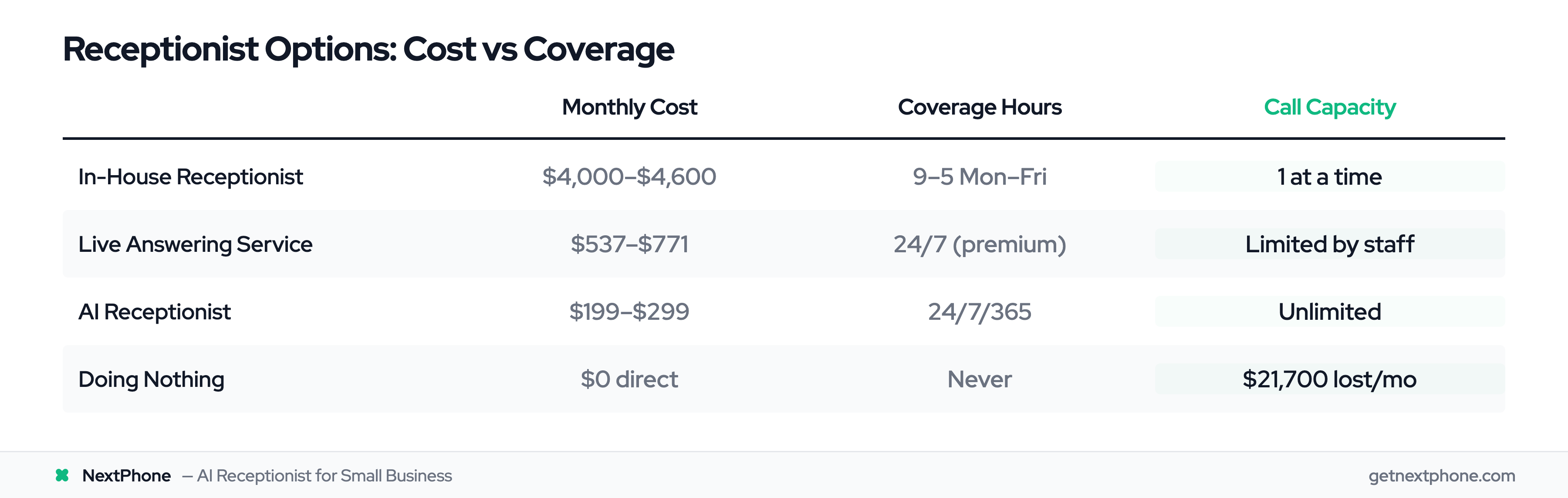
Let's put all the options side by side:
In-house receptionist:
- Salary: $35,000-37,000/year (Bureau of Labor Statistics median wage)
- Benefits: +25-40% ($8,750-14,800/year)
- Payroll taxes: ~7.65% ($2,750/year)
- Training/onboarding: $1,000-2,000
- Workspace/equipment: $500-1,000/year Total cost: $48,000-55,000/year ($4,000-4,600/month)
- Coverage: 9-5 Monday-Friday only
- Downside: Sick days, vacation time, managing an employee
Live answering service (Ruby Receptionists example):
- Base plan: $319/month + $5.19/call
- For 42 calls/month: $319 + $218 = $537/month ($6,444/year)
- For 87 calls/month (busy season): $319 + $452 = $771/month
- Coverage: 24/7 (for premium pricing)
- Downside: Per-call charges add up fast with volume
AI receptionist:
- Flat rate: $199-299/month for full-featured solutions
- Typical: $199/month = $2,388/year
- Coverage: 24/7/365 unlimited calls
- Downside: Less personal than humans for complex calls (smart forwarding handles these)
Doing nothing (missed calls):
- Direct cost: $0/month
- Lost revenue: $21,700/month average = $260,400/year
- Opportunity cost: Incalculable (reputation damage, customer frustration, market share loss)
The math is clear: AI costs 85-95% less than human receptionists while providing better coverage (24/7 vs. 9-5), and the cost is a rounding error compared to what you're losing to missed calls.
Research shows businesses using AI save $250,000+ over 5 years compared to hiring full-time staff. For small businesses, many recover the cost of their AI receptionist by capturing just one additional appointment.