
Introduction
85% of customers whose calls aren't answered will not call back. They'll call your competitor instead.
That's not a scare tactic. It's what happens when your phone rings and nobody picks up. The customer needed help, tried you first, got nothing, and moved on. By the time you see the missed call notification, they've already hired someone else.
And here's the brutal reality for small business owners: industry research shows 60-80% of business calls go unanswered. Not because owners don't care, but because they're busy doing the actual work. You can't answer the phone when you're on a ladder, under a sink, or meeting with a client.
This guide covers the phone answering best practices that capture more customers - from response time benchmarks to professional greetings to message-taking essentials. You'll learn what actually matters, what common mistakes cost you, and when AI can help versus when you need a human on the line.
Why Phone Answering Practices Matter
Every unanswered call is a potential customer choosing your competitor. And every poorly handled call is a first impression you can't take back.
The First Impression Problem
For most customers, the phone call is their first real interaction with your business. They've seen your website, maybe read some reviews, but this call is where they decide if you're professional, responsive, and worth their money.
Research shows 65% of customers still prefer calling over other contact methods. Despite email, chat, and text options, picking up the phone remains the go-to for anyone who needs quick answers or wants to talk to a real person.
What happens during that call shapes everything that follows. A friendly, professional answer says "we've got our act together." Voicemail says "we're too busy for you." A fumbling, unprofessional greeting says "maybe try someone else."
What Missed Calls Really Cost

The math on missed calls is brutal.
According to Forbes customer research, 85% of customers whose calls aren't answered won't call back. They're not waiting around hoping you return their call. They're dialing the next name on their list.
HubSpot's research adds another layer: 78% of customers buy from the first business that responds to their inquiry. Not the cheapest. Not the best reviewed. The first to pick up wins.
Apply that to your business. If you're getting 40 calls a month and missing 60-80% of them (the industry average), that's 24-32 potential customers calling your competitors because you didn't answer.
Industry data shows those calls break down like this:
- 6.9% are quote or estimate requests - potential projects worth hundreds or thousands
- 6.2% are emergencies - high-margin jobs from customers who need help NOW
- 7.7% are appointment scheduling requests - ready-to-book customers
One message in our data literally said: "Wants an estimate for a new roof. No urgency." The customer said no urgency - but they're calling NOW. If you don't answer, they call the next roofer. Your "not urgent" call becomes someone else's $15,000 project.
Response Time Benchmarks
How fast should you answer? There are specific benchmarks, and they matter more than you might think.
The 3-Ring Rule
The industry standard is the 3-ring rule: answer your business phone within 3 rings, which translates to about 10 seconds.
Why 3 rings? Because that's the sweet spot where callers feel attended to without feeling rushed. Any faster can seem startling. Any longer and they start wondering if anyone's there. 82% of customers expect an immediate response—and "immediate" means seconds, not minutes.
According to industry research, caller satisfaction begins dropping after 3 rings (about 18 seconds). By the time voicemail kicks in at 4-5 rings, the caller is already frustrated - and 85% won't bother leaving a message.
What Happens After 20 Seconds
Here's the timeline of what goes through a caller's head:
Rings 1-2 (0-8 seconds): "They're about to pick up."
Ring 3 (10 seconds): "Okay, maybe they're finishing something up."
Ring 4 (15 seconds): "Are they even there?"
Ring 5+ (20+ seconds): "Should I hang up? Is this a real business?"
Most callers hang up somewhere between 20-30 seconds if they don't reach a person or get any indication someone will answer. For calls involving urgency - the 15.9% that contain words like "emergency," "ASAP," or "urgent" - patience runs even thinner.
Industry Standards to Hit
Excellent: 2-3 rings (6-10 seconds) - Caller feels prioritized Good: 4 rings (12-15 seconds) - Acceptable, but pushing it Poor: 5+ rings (18+ seconds) - Caller frustration building Voicemail: 6+ rings - 85% won't leave a message
For comparison, traditional live answering services take 30-90 seconds to connect a caller to a person. AI systems answer in 2-3 rings consistently. And letting it ring to voicemail? That's not answering at all.
Professional Greetings That Work
What you say in the first 10 seconds sets the tone for the entire call. Here's how to get it right.
The Greeting Formula
Professional phone greetings follow a simple three-part formula:
Company Name + Your Name + Offer to Help
That's it. No need for elaborate scripts, taglines, or mission statements. Just tell them they've reached the right place, who they're talking to, and that you're ready to help.
The whole greeting should take under 10 seconds. Any longer and you're wasting the caller's time before they can even state their reason for calling.
CALLOUT BOX: The Greeting Formula
- Company name (who they reached)
- Your name (who they're speaking with)
- Offer to help (invitation to continue)
Examples That Work
For service businesses: "Thanks for calling ABC Plumbing, this is Mike, how can I help you?"
Slightly more formal: "Good morning, Smith Electrical, this is Sarah speaking. What can I do for you?"
Efficient but friendly: "Johnson Roofing, Tom here. How can I help?"
Notice what these all have in common: short, clear, and ending with an invitation for the caller to speak. The caller knows they reached the right place and can immediately explain why they're calling.
What Not to Say
-
"Hello?" - Sounds like you answered your personal phone by mistake. Unprofessional.
-
"Yeah?" - Even worse. Suggests you're bothered by the interruption.
Just the company name: "ABC Plumbing." - Abrupt. Doesn't tell them who they're talking to or invite them to continue.
A 30-second script: "Thank you for calling ABC Plumbing, your trusted neighborhood plumbing experts serving the greater metro area for over 25 years with award-winning service and a commitment to excellence. This is Mike. How may I direct your call?" - By the time you finish, they've forgotten why they called.
Keep it natural. You're not reading a radio advertisement. You're greeting a potential customer who wants to talk to a real person.
Message-Taking Essentials
When you can't help the caller immediately - whether you're taking a message for someone else or need to call them back - getting the right information matters.
The 5 Must-Have Fields
Every message should capture five pieces of information:
- Caller's name - "Who should we say called?"
- Phone number - Get it even if caller ID shows it (verify accuracy)
- Reason for call - Brief description of what they need
- Urgency level - Is this time-sensitive?
- Best callback time - When can they be reached?
Miss any of these and you're set up for frustration. Without the reason, the callback becomes a guessing game. Without urgency flagged, an emergency might wait until tomorrow. Without a callback time, you might call during dinner or a meeting.
MESSAGE TEMPLATE BOX Message For: _______________ Date/Time: _______________ Caller Name: _______________ Phone Number: _______________ Reason for Call: _______________ Urgency Level: [ ] Routine [ ] Same Day [ ] Emergency Best Callback Time: _______________ Taken By: _______________
Urgency Detection
Industry data shows 15.9% of business calls contain urgency language - words like "urgent," "ASAP," "emergency," "today," or "immediately."
Listen for these phrases:
- "I need someone today"
- "This is urgent"
- "It's an emergency"
- "As soon as possible"
- "Can someone come right now?"
When you hear urgency, flag it clearly. Write "URGENT" in big letters. Move that message to the top of the pile. These calls can't wait for the normal callback process.
Real examples from customer calls:
- "Urgent: Need emergency AC repair, no cooling in 95 degree weather."
- "Pipe burst in basement, need plumber immediately."
- "Roof is leaking during rainstorm, needs response today."
Callback Tracking
Here's a stat that should concern you: 25.4% of business callers explicitly request a callback. One in four people calling you wants someone to call them back.
And here's the problem: industry research suggests 42% of callback requests never get returned. Nearly half of people who specifically asked for a return call are left waiting.
That's not just a missed sale. It's a customer who now thinks your business is unreliable or doesn't care.
Track every callback request. Log when the request came in, who's responsible for returning it, and when it gets done. Don't let callbacks fall through the cracks - those are people who already tried to give you their business.
Common Phone Answering Mistakes
Some phone habits seem minor but create immediate negative impressions.
Mistakes That Cost Customers
Answering with "Hello?" Sounds like you answered by accident. Immediately makes the caller wonder if they reached a business or someone's personal phone.
Putting on hold without permission "Hold please." click - The caller didn't agree to hold. They don't know why they're holding or for how long. This breeds frustration fast.
Rushing the caller Speaking quickly, cutting them off, or sounding impatient sends a clear message: you have better things to do. Even if you're slammed, the caller shouldn't feel like an inconvenience.
Incomplete messages Taking a name and number but not the reason for the call creates extra work. Now someone has to call back without knowing what the caller needs, making them repeat themselves.
Eating or chewing Sounds obvious, but it happens. Callers can hear chewing, crunching, and slurping. Put the snack down before answering.
Voice and Tone Errors
Speaking too fast You know your company name. The caller might be hearing it for the first time. Slow down, especially during the greeting.
Mumbling If callers have to ask "What was that?" or "Can you repeat that?", you've already created friction. Speak clearly.
Monotone voice Sounding bored or robotic suggests you don't want to be on this call. Add some energy - not fake enthusiasm, just genuine warmth.
Sounding annoyed We all have bad days. But the caller doesn't know you've taken 47 calls already. Each person deserves the same professional treatment as the first caller of the day.
Handling Difficult Situations
Not every call is straightforward. Here's how to handle the tricky ones.
Putting Callers on Hold Properly
If you need to put someone on hold, follow this sequence:
- Ask permission: "May I put you on a brief hold while I check on that?"
- Explain why: "I need to pull up that information."
- Give a time estimate: "It should just be about 30 seconds."
- Check back: If it's taking longer, come back and update them.
Never put someone on hold without asking. And never leave them hanging without checking in. A caller on hold for 2 minutes with no updates feels abandoned.
Transferring Calls Without Losing Them
When you transfer a call:
- Explain who you're transferring to: "I'm going to transfer you to Sarah in scheduling."
- Provide context to the recipient: Brief them on what the caller needs so they don't have to repeat everything.
- Stay on the line: Wait until the connection is made. Don't blind-transfer into the void.
- Have a backup: If the transfer fails or goes to voicemail, come back and offer alternatives.
Nothing frustrates callers more than being transferred three times, explaining their situation each time, then getting dropped.
Dealing with Angry Callers
Angry callers happen. Here's how to handle them:
Stay calm. Don't match their energy. Lower, slower speech is calming.
Listen actively. Let them vent. Don't interrupt. Sometimes they just need to be heard.
Acknowledge the frustration. "I understand that's frustrating" or "I can see why that would be upsetting."
Focus on solutions. Once they've expressed their concern, pivot to what you can do: "Here's what I can do to help fix this."
Never argue. You won't win, and you'll definitely lose the customer.
Screening Spam Calls
35% of all US phone calls are spam or fraud—and for small businesses, about 7% of incoming calls are spam or robocalls. That's wasted time and interruption.
Signs of spam:
- Silence or long pause when you answer
- Recorded message starts playing
- Caller asks generic questions not specific to your business
- Caller ID shows "Unknown" or out-of-area numbers with suspicious patterns
Your response: Be brief. "Sorry, we're not interested." Hang up. Don't engage or provide information. And if you're getting flooded with spam, consider solutions that can filter automatically.
When to Use AI vs. Human Answering
Here's the reality that most phone etiquette guides ignore: small business owners often can't answer the phone because they're doing the actual work that makes them money.
The Owner-Operator Reality
You're a plumber. Your phone rings while you're under a sink fixing a leak for the customer who's paying you. What do you do?
You're an electrician. You're in an attic running wire with both hands full. The phone buzzes in your pocket. You can't exactly stop mid-job.
You're a contractor. You're on a roof in the middle of an install. Your phone is in the truck.
This isn't a training issue or a dedication issue. It's a math problem. You can't physically answer every call while also doing the work that generates revenue. Traditional phone etiquette advice assumes you have staff to answer phones. Many small businesses don't.
What AI Handles Well
Modern AI phone answering excels at:
-
24/7 availability - AI doesn't sleep, take lunch, or go on vacation. Every call gets answered, day or night.
-
Consistent greetings - Same professional greeting every time, never having a bad day.
-
Message-taking - Captures all 5 essential fields without fail.
-
Appointment scheduling - Can check calendar availability and book directly.
-
Spam filtering - Identifies and blocks that 7% of spam calls automatically.
-
Urgency detection - Recognizes emergency language (15.9% of calls) and routes accordingly.
For routine calls - business hours, service inquiries, appointment requests - AI handles these flawlessly.
When You Need Humans
AI isn't the answer for everything. Humans are essential for:
-
Complex situations - Calls requiring judgment, expertise, or nuanced decisions.
-
Emotional callers - Someone who's upset needs empathy, not scripts.
-
Negotiations - Pricing discussions, complaints, or situations requiring flexibility.
-
VIP treatment - When personal attention is the point (high-value clients, referral sources).
The best approach is hybrid: AI handles the routine 60-80% of calls, freeing you to focus on the complex 20-40% that actually need your attention.
After-Hours Solutions
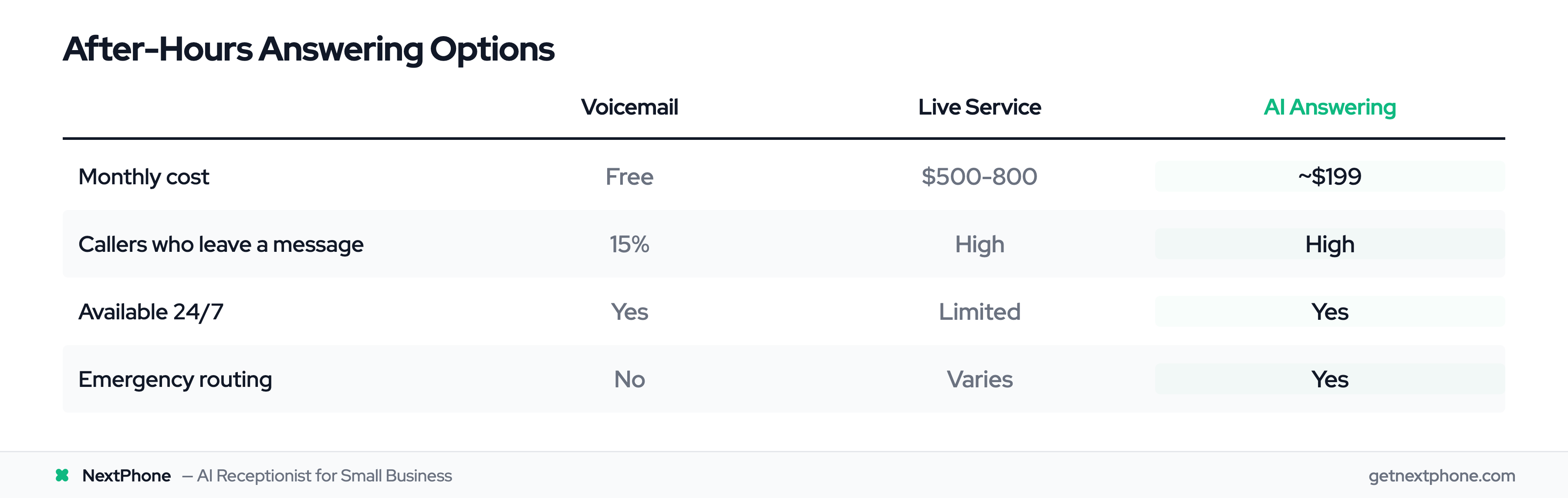
15.9% of calls contain urgency language. Many of those come after business hours - evenings, weekends, holidays.
Your options:
Voicemail: Free, but 85% of callers won't leave a message. You're essentially closed.
Live answering service: Personal touch, but expensive ($500-800/month) and often unavailable at 2 AM.
AI answering: Available 24/7, captures messages, routes emergencies, starting around $199/month.
AI can detect those urgency keywords - "emergency," "flooding," "no heat" - and route those calls to your cell phone immediately while letting routine messages wait until morning.
According to Gartner, 85% of customer service leaders will explore or pilot AI solutions in 2025. This isn't future technology - it's what businesses are adopting now.
Ready to stop missing calls when you're busy? See how AI can help →
Training Your Team
If you have staff answering phones, consistent training makes the difference between professional and amateur.
Creating Phone Answer Standards
Document your expectations:
Greeting script: Write out exactly how phones should be answered. Not a word-for-word robot script, but the formula and examples.
Message requirements: List the 5 fields every message must include. Make forms or templates available.
Hold and transfer procedures: When is hold acceptable? How long is too long? Who handles what types of calls?
Escalation paths: What warrants an immediate interrupt versus a callback? Who handles angry callers or complex situations?
Put it in writing. Post it by the phone. Make expectations clear.
Practice and Feedback
Reading about phone skills isn't the same as having them.
Role-play before live calls. Have new staff practice greetings and common scenarios before they answer real customer calls.
Listen to calls together. Where legal and disclosed, record calls for training purposes. Review what went well and what could improve.
Give specific feedback. "Good greeting, but you spoke a little fast" is more useful than "do better."
Refresher sessions. Phone skills fade without practice. A quick 15-minute session every few weeks keeps everyone sharp.
Track what matters: How quickly are phones answered? Are callers satisfied? Are callbacks completed? First-call resolution (FCR) is a key metric—the benchmark is 70% average, ranging from 50-90% depending on industry. What you measure tends to improve.
How NextPhone Solves This
For small businesses that can't afford full-time receptionists and can't answer every call themselves, NextPhone offers AI-powered phone answering starting at $199/month.
24/7 Professional Answering
When a call comes in, NextPhone's AI answers in 2-3 rings - every time, day or night. The caller hears a professional greeting, not voicemail.
The AI handles what you'd want any good receptionist to handle:
- Common questions: Hours, services, service area, basic pricing
- Message-taking: Captures all 5 essentials - name, number, reason, urgency, callback preference
- Appointment scheduling: Checks your calendar and books directly
- Spam filtering: Identifies and blocks that 7% of junk calls
You wake up to a summary of every call and a calendar with new appointments already booked.
Smart Routing for Emergencies
Remember that 6.2% of calls are emergencies and 15.9% contain urgency language? NextPhone detects these.
When someone calls about a burst pipe, a roof leak during a storm, or an AC failure in 95-degree heat, the AI recognizes the urgency and routes the call to your phone immediately. Routine calls get handled. Emergencies reach you.
One HVAC contractor told us: "I can't answer my phone when I'm on a roof. NextPhone handles it and my schedule stays full. It's like having a receptionist for $200/month."
Compare that to a full-time receptionist at $37,000/year according to Bureau of Labor Statistics data, or live answering services at $500-800/month for limited call volume.
See how NextPhone handles calls when you can't →
Frequently Asked Questions
What is the 3-ring rule for answering phones?
The 3-ring rule means answering your business phone within 3 rings, which is about 10 seconds. This is the industry standard for professional phone answering. Research shows caller satisfaction begins dropping after 3 rings, and by 4-5 rings (when voicemail typically kicks in), callers are already frustrated. Best practice is answering in 2-3 rings when possible.
How should I answer a business phone professionally?
Use the greeting formula: Company name + Your name + Offer to help. For example: "Thanks for calling ABC Plumbing, this is Mike, how can I help you?" Keep the greeting under 10 seconds - warm and clear, but not robotic or scripted-sounding. The caller should immediately know they reached the right place and feel invited to explain their needs.
What information should I collect when taking a message?
Every business message should capture 5 essentials: caller's name, phone number, reason for call, urgency level, and best callback time. Industry data shows 25.4% of callers explicitly request callbacks, and 42% of those requests go unreturned. Having complete information - especially urgency level - ensures callbacks happen promptly and with context.
How long should I let a business phone ring?
Answer within 3 rings (about 10 seconds) when possible. Four rings is acceptable but pushing it. At 5+ rings, caller frustration is building. Most callers hang up after 20-30 seconds of ringing, and 85% of people who can't reach you won't call back. They'll call your competitor instead.
Is it better to use voicemail or an answering service?
Neither is ideal alone. Voicemail is free but loses 85% of callers (most won't leave a message). Live answering services provide a personal touch but cost $500-800/month and have limited hours. AI answering offers 24/7 coverage, professional handling, and costs around $199/month - best of both worlds for small businesses.
How do I handle calls after business hours?
After-hours calls often include urgency - 15.9% of all calls contain urgent language, and many of those come evenings and weekends. Options include voicemail (loses most callers), live services (expensive and limited availability), or AI answering (24/7 at affordable rates). AI can detect emergency language and route urgent calls to your phone while handling routine messages overnight.
Can AI really answer business calls professionally?
Yes. Modern AI phone systems sound natural, not robotic. They handle routine calls - greetings, message-taking, scheduling, FAQs - with consistent professionalism. For complex situations requiring judgment or empathy, AI routes callers to humans. Gartner reports 85% of customer service leaders will explore or pilot AI in 2025. This technology is mainstream, not experimental.
Capture Every Call That Could Become a Customer
Phone answering best practices aren't complicated: answer quickly, greet professionally, take complete messages, and don't let callers slip through the cracks.
The businesses winning today aren't necessarily the best at their trade. They're the ones who answer every call. They're the ones who capture that 85% that won't call back. They're the ones turning phone rings into appointments while competitors send customers to voicemail.
The challenge for small business owners is simple: you can't always answer because you're doing the work. That's where professional practices - whether through trained staff, documented procedures, or AI technology - make the difference between captured customers and lost opportunities.
Ready to capture every call? Start your free 7-day trial of NextPhone and see how AI can answer when you can't.